Declaration
public static float FloatField(Rect position, float value, GUIStyle style = EditorStyles.numberField);Declaration
public static float FloatField(Rect position, string label, float value, GUIStyle style = EditorStyles.numberField);Declaration
public static float FloatField(Rect position, GUIContent label, float value, GUIStyle style = EditorStyles.numberField);Parameters
| Parameter | Description |
|---|---|
| position | Rectangle on the screen to use for the float field. |
| label | Optional label to display in front of the float field. |
| value | The value to edit. |
| style | Optional GUIStyle. |
Returns
float The value entered by the user.
Description
Makes a text field for entering floats.
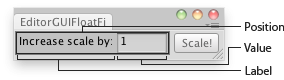
Float Field in an Editor Window.
using UnityEngine;
using UnityEditor;

public class EditorGUIFloatField : EditorWindow
{
    float sizeMultiplier = 1;

    [MenuItem("Examples/Scale selected Object")]
    static void Init()
    {
        var window = GetWindow<EditorGUIFloatField>();
        window.position = new Rect(0, 0, 210, 30);
        window.Show();
    }

    void OnGUI()
    {
        sizeMultiplier = EditorGUI.FloatField(new Rect(3, 3, 150, 20),
            "Increase scale by:",
            sizeMultiplier);

        if (GUI.Button(new Rect(160, 3, 45, 20), "Scale!"))
        {
            Selection.activeTransform.localScale = Selection.activeTransform.localScale * sizeMultiplier;
        }
    }
}