AI menu reference
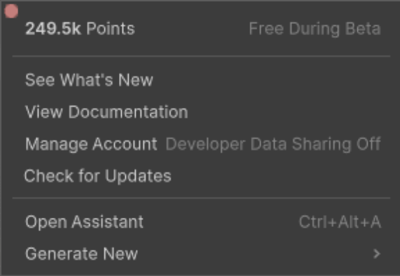
Use the AI menu to track credits usage, manage your account, and launch the features.
| Options | Description |
|---|---|
| Credits | Displays your available AI credits. When you use various Unity’s AI features, it consumes credits, and the credit counter updates to reflect your current credit balance. Your credit balance number includes both monthly allocated credits (if you’re a Unity paid user) and any additional credits you have purchased separately. |
| See what’s New | Provides onboarding content, tutorials, and updates on Assistant, Generators, and Sentis. |
| View Documentation | Opens the Unity’s AI documentation. |
| Manage Account | Opens Unity Cloud account settings for AI-related services. |
| Check for Updates | Links to the Package Manager to check for updates to Unity’s AI packages. |
| Open Assistant | Opens the in-editor AI assistant. |
| Generate New | Opens asset generation options for Animation, Material, Sound, Sprite, and Texture. |