Prefab instance Inspector reference
When you create an instance of a prefab, the Inspector contains specific prefab settings which you can use to edit the prefab instance and its parent prefab asset.
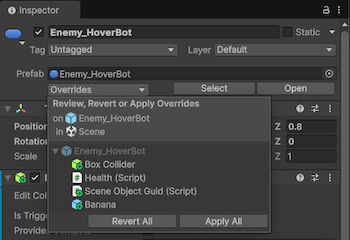
Overrides
Opens the Overrides dropdown window which displays any overrides of the prefab instance. Use this window to apply overrides from the instance to the prefab asset, or revert overrides on the instance back to the values on the prefab asset. The Overrides window is only available for the root prefab instances, and not nested prefabs.
You can apply all changes to the asset with the following options:
- Revert All: Reverts all overrides on the prefab instance to the default setup of the parent prefab asset.
- Apply All: Applies all overrides on the prefab instance to the parent prefab asset.
If you want to apply or revert individual changes, select the specific override in the list, and then use the Revert or Apply buttons on the individual override.
For more information on prefab overrides, refer to Override prefab instances.
Select
Selects the parent prefab asset of the prefab instance in the Project window.
Open
Open the parent prefab asset of the prefab instance in prefab editing mode.