Understand physics performance issues
The physics simulation runs on a separate fixed frequency update cycle from the main logic’s update loop, and can only advance time via a Time.fixedDeltaTime per call. This is similar to the difference between Update and FixedUpdate. For more information, refer to the documentation on the Time window.
When a heavy logic or graphics frame takes a long amount of time, the Profiler has to call the physics simulation multiple times per frame. This means that an already resource-intensive frame takes even more time and resources. This might cause the physics simulation to temporarily stop according to the Maximum Allowed Timestep value, which you can set in the Project Settings window (menu: Edit > Project Settings > Time)
To detect this in your project, select the CPU Usage Profiler module and check the number of calls for Physics.Processing or Physics.Simulate in the Overview section in the Hierarchy view.
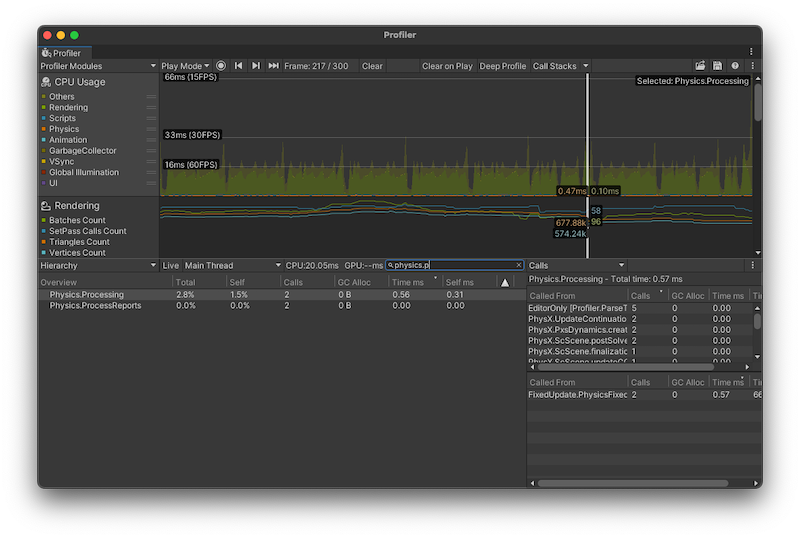
In this example image, the value of 2 in the Calls column indicates that the physics simulation was called two times over the last logical frame.
A call count close to 10 might indicate an issue. As a first solution, reduce the frequency of the physics simulation, and if the issue continues, check what might have caused the heavy frame before the physics system had to use a lot of simulation calls to catch up with the game time. Sometimes, a heavy graphics frame might cause more physics simulation calls later on in a scene.
For detailed information about the physics simulation in your scene, select the search box at the top of the module details pane, search for Physics.Processing, and then select Calls from the dropdown at the top right of the pane. This displays the names of the physics system tasks that run to update your scene, such as the following:
- Pxs: PhysX solver, which are physics system tasks that joints require and resolving contacts for overlapping Rigidbody components.
- ScScene: Used for tasks that update the scene, run the broad phase and narrow phase, and integrate Rigidbody components (moving them in space due to forces and impulses).