レシート検証
レシート検証によって、ユーザーが購入していないコンテンツにアクセスすることを防ぎます。
検証のポイント レシートはアプリケーションのコンテンツを配布する時点で検証するのが最も効率的です。
- ローカル検証: すべてのコンテンツがアプリケーションに含まれ、購入後に有効になるクライアント側コンテンツの場合、ターゲットデバイスでの検証をリモートサーバーに接続しなくても行える必要があります。Unity IAP は、アプリケーション内のローカル検証をサポートするように設計されています。詳細については、後述の__ローカル検証__を参照してください。
- リモート検証: 購入してからコンテンツをダウンロードするサーバー側のコンテンツに関しては、検証は、コンテンツがリリースされる前にサーバー上で行われるべきです。Unity ではサーバー側の検証をサポートしていませんが、例えば Nobuyori Takahashi の IAP project などのサードパーティ製ソリューションを使用することは可能です。
ローカル検証
重要: Unity IAP はローカルな検証方法を提供していますが、ローカルな検証は不正に対してより脆弱です。可能であれば、機密性の高いトランザクションをサーバーサイドで検証することがベストプラクティスと考えられます。詳細については、不正防止に関する Apple および Android のドキュメントを参照してください。
ユーザーが購入するコンテンツがすでにデバイスに存在する場合は、アプリケーションはただ、それをアンロックするかどうかを決定するだけです。
Unity IAP はコンテンツを隠し、Google Play と App Store をとおしてレシートを検証し分析するツールを提供します。
難解化
レシート検証は既知の暗号化キーを使用して実行されます。Unity ユーザーのアプリケーションの場合は、暗号化された Google Play 公開鍵や Apple のルート証明書などです。
攻撃者がこれらの機密情報を置き換えることができると、レシート検証は失敗してしまいます。そのため、攻撃者が簡単にこれらのキーを見つけ、改変できないようにすることが大切です。
Unity IAP はアプリケーション内の秘密鍵を見つかりにくくするツールを提供します。このツールが鍵をわかりにくくするため、攻撃者によるアクセスはより難しくなります。Unity のメニューで Window > Unity IAP > IAP Receipt Validation Obfuscator に移動してください。
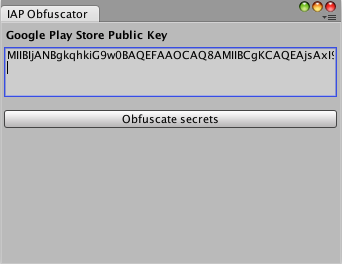
このウィンドウで、Apple のルート証明書 (Unity IAP にバンドル) と Google Play 公開鍵 (アプリケーションの Google Play 開発者コンソールの Services & APIs ページから) の両方を、2 つの異なる C# ファイル (AppleTangle と GooglePlayTangle) にエンコードできます。これらは、次のセクションで使用するためにプロジェクトに追加されます。
注意: Apple ストアだけをターゲットにする場合は、Google Play 公開キーは必要ではありません。同様にGoogle Play だけをターゲットにする場合は、Apple のルート証明書は必要ではありません。
レシートの検証
CrossPlatformValidator クラスは、Google Play と Apple ストア両方の検証に使用することができます。
このクラスを使用するには、Google Play 公開キーか Apple の root 証明書が必要です。また、両方のプラットフォームを検証するなら両方が必要です。
CrossPlatformValidator によって以下の 2 つをチェックします。
- 署名検証を通して、レシートの信頼性が確認されます。
- レシートのアプリケーションバンドル ID が、アプリケーションの ID と比較されます。一致しない場合、InvalidBundleId の例外がスローされます。
バリデーターは Google Play と Apple プラットフォームで作成されたレシートのみを検証することに注意してください。エディターで作成された偽造を含め、その他のプラットフォームで作成されたものには、IAPSecurityException の例外が発生します。
必要な秘密鍵を提供していないプラットフォームのレシートを検証しようとすると、MissingStoreSecretException の例外が発生します。
public PurchaseProcessingResult ProcessPurchase (PurchaseEventArgs e)
{
    bool validPurchase = true; // Presume valid for platforms with no R.V.

    // Unity IAP's validation logic is only included on these platforms.
#if UNITY_ANDROID || UNITY_IOS || UNITY_STANDALONE_OSX
    // Prepare the validator with the secrets we prepared in the Editor
    // obfuscation window.
    var validator = new CrossPlatformValidator(GooglePlayTangle.Data(),
        AppleTangle.Data(), Application.bundleIdentifier);

    try {
        // On Google Play, result has a single product ID.
        // On Apple stores, receipts contain multiple products.
        var result = validator.Validate(e.purchasedProduct.receipt);
        // For informational purposes, we list the receipt(s)
        Debug.Log("Receipt is valid. Contents:");
        foreach (IPurchaseReceipt productReceipt in result) {
            Debug.Log(productReceipt.productID);
            Debug.Log(productReceipt.purchaseDate);
            Debug.Log(productReceipt.transactionID);
        }
    } catch (IAPSecurityException) {
        Debug.Log("Invalid receipt, not unlocking content");
        validPurchase = false;
    }
#endif

    if (validPurchase) {
        // Unlock the appropriate content here.
    }

    return PurchaseProcessingResult.Complete;
}
レシートが有効かどうかだけでなく、どのような情報が含まれているかを確認することが重要です。購入せずにコンテンツにアクセスしようとするユーザーの一般的なテクニックは、他の製品やアプリケーションのレシートを使用することです。これらのレシートは本物であり、検証に合格します。そのため、判定は CrossPlatformValidator によって解析された製品 ID に基づく必要があります。
ストア別詳細
ストアによって、購入レシートのフィールドが異なります。ストア固有のフィールドにアクセスするには、IPurchaseReceipt を 2 つの異なるサブタイプ (GooglePlayReceipt と AppleInAppPurchaseReceipt) にダウンキャストします。
var result = validator.Validate(e.purchasedProduct.receipt);
Debug.Log("Receipt is valid. Contents:");
foreach (IPurchaseReceipt productReceipt in result) {
    Debug.Log(productReceipt.productID);
    Debug.Log(productReceipt.purchaseDate);
    Debug.Log(productReceipt.transactionID);

    GooglePlayReceipt google = productReceipt as GooglePlayReceipt;
    if (null != google) {
        // This is Google's Order ID.
        // Note that it is null when testing in the sandbox
        // because Google's sandbox does not provide Order IDs.
        Debug.Log(google.transactionID);
        Debug.Log(google.purchaseState);
        Debug.Log(google.purchaseToken);
    }

    AppleInAppPurchaseReceipt apple = productReceipt as AppleInAppPurchaseReceipt;
    if (null != apple) {
        Debug.Log(apple.originalTransactionIdentifier);
        Debug.Log(apple.subscriptionExpirationDate);
        Debug.Log(apple.cancellationDate);
        Debug.Log(apple.quantity);
    }
}
Apple レシートの Raw データの解析
AppleValidator クラスは、Apple レシートの詳細な情報を抽出するために使用されます。このクラスは、Apple の廃止予定のトランザクションレシートではなく、iOS 7.0 以降のバージョンの App Store レシートにのみ正しく機能するため、注意してください。
#if UNITY_ANDROID || UNITY_IOS || UNITY_STANDALONE_OSX
var builder = ConfigurationBuilder.Instance(StandardPurchasingModule.Instance());
// Get a reference to IAppleConfiguration during IAP initialization.
var appleConfig = builder.Configure<IAppleConfiguration>();
var receiptData = System.Convert.FromBase64String(appleConfig.appReceipt);
AppleReceipt receipt = new AppleValidator(AppleTangle.Data()).Validate(receiptData);

Debug.Log(receipt.bundleID);
Debug.Log(receipt.receiptCreationDate);
foreach (AppleInAppPurchaseReceipt productReceipt in receipt.inAppPurchaseReceipts) {
    Debug.Log(productReceipt.transactionIdentifier);
    Debug.Log(productReceipt.productIdentifier);
}
#endif
AppleReceipt タイプは Apple の ASN1 レシート形式をモデルにしています。フィールドの説明については、Apple のドキュメントを参照してください。