Create OpenXR features
You can add features to Unity OpenXR to customize or support hardware and other OpenXR functionality not available in the Unity OpenXR package.
If you are creating multiple features and want to organize them in a group, refer to Define a feature groups.
If your feature requires a custom OpenXR loader library or a more recent version of the standard library than is currently available in the Unity OpenXR package, refer to Require a custom loader library.
Define an OpenXR feature
Unity OpenXR features are defined and executed in C#. C# can call to a custom native plug-in if desired. The feature can live somewhere in the user's project or in a package, and it can include any Assets that a normal Unity project would use.
A feature must override the OpenXRFeature ScriptableObject class. There are several methods that you can override on the OpenXRFeature class in order to do things like intercepting native OpenXR calls, obtaining the xrInstance and xrSession handles, starting Unity subsystems, etc.
A feature can add public fields for user configuration at build time. Unity renders these fields via a PropertyDrawer in the feature UI, and you can override them. Your feature can access any of the set values at runtime.
A feature must also provide an OpenXRFeature attribute when running in the Editor.
#if UNITY_EDITOR
using UnityEditor;
using UnityEngine;
using UnityEngine.XR.OpenXR;
using UnityEngine.XR.OpenXR.Features;

namespace UnityEngine.XR.OpenXR.CodeSamples.Editor.Tests
{
    public class InterceptCreateSessionFeatureExample : OpenXRFeature
    {
        /// <summary>
        /// The feature id string. Provides a well known id for
        /// referencing the feature.
        /// </summary>
        public const string featureId =
            "com.unity.openxr.feature.example.intercept";
    }
}
#endif
Unity uses this information in the Editor, either to build the Player or to display it to the user in the OpenXR settings.
Enabling OpenXR spec extension strings
Unity attempts to enable any extension strings listed in OpenXRFeatureAttribute.OpenxrExtensionStrings (separated via spaces) on startup. Your feature can check the enabled extensions to determine if the requested extension was enabled (via OpenXRRuntime.IsExtensionEnabled).
using UnityEngine;
using UnityEngine.XR.OpenXR;
using UnityEngine.XR.OpenXR.Features;

namespace UnityEngine.XR.OpenXR.CodeSamples.Editor.Tests
{
    public class OnInstanceCreateExtensionCheckExample : OpenXRFeature
    {
        protected override bool OnInstanceCreate(ulong xrInstance)
        {
            if (!OpenXRRuntime.IsExtensionEnabled("XR_UNITY_mock_driver"))
            {
                Debug.LogWarning("XR_UNITY_mock_driver is not enabled, " +
                                 "disabling Mock Driver.");
                return false;
            }
            if (OpenXRRuntime.GetExtensionVersion("XR_UNITY_mock_driver") < 100)
                return false;
            return true;
        }
    }
}
OpenXRFeature call order
The OpenXRFeature class has a number of methods that your method can override. Implement overrides to get called at specific points in the OpenXR application lifecycle.
Bootstrapping
HookGetInstanceProcAddr
This is the first callback invoked, giving your feature the ability to hook native OpenXR functions.
Initialize
OnInstanceCreate => OnSystemChange => OnSubsystemCreate => OnSessionCreate
The initialize sequence allows features to initialize Unity subsystems in the Loader callbacks and execute them when specific OpenXR resources are created or queried.
Start
OnFormFactorChange => OnEnvironmentBlendModeChange => OnViewConfigurationTypeChange => OnSessionBegin => OnAppSpaceChange => OnSubsystemStart
The Start sequence allows features to start Unity subsystems in the Loader callbacks and execute them when the session is created.
Game loop
Several: OnSessionStateChange
OnSessionBegin
Maybe: OnSessionEnd
Callbacks during the game loop can react to session state changes.
Stop
OnSubsystemStop => OnSessionEnd
Shut down
OnSessionExiting => OnSubsystemDestroy => OnAppSpaceChange => OnSessionDestroy => OnInstanceDestroy
Build Time Processing
A feature can inject some logic into the Unity build process in order to do things like modify the manifest.
Typically, you can do this by implementing the following interfaces:
IPreprocessBuildWithReportIPostprocessBuildWithReportIPostGenerateGradleAndroidProject
Features should not implement these classes, but should instead implement OpenXRFeatureBuildHooks, which only provide callbacks when the feature is enabled. For more information, refer to the OpenXRFeatureBuildHooks class.
Build time validation
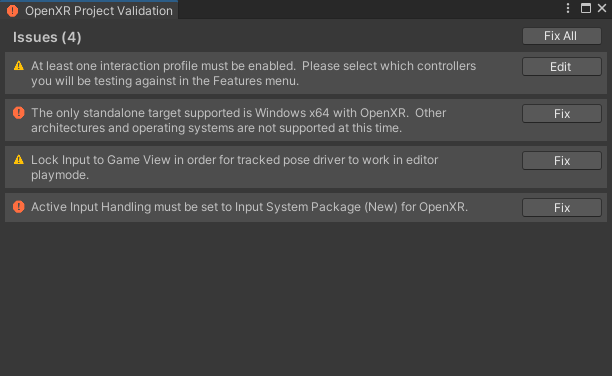
If your feature has project setup requirements or suggestions that require user acceptance, implement GetValidationChecks. Features can add to a list of validation rules which Unity evaluates at build time. If any validation rule fails, Unity displays a dialog asking you to fix the error before proceeding. Unity can also present a warning through the same mechanism. It's important to note which build target the rules apply to.
Example:
using System.Collections.Generic;
using System.Linq;
using UnityEditor;
using UnityEngine.XR.OpenXR;
using UnityEngine.XR.OpenXR.Features;

namespace UnityEngine.XR.OpenXR.CodeSamples.Editor.Tests
{
#if UNITY_EDITOR
    public class BuildTimeValidationExample : OpenXRFeature
    {
        protected override void GetValidationChecks(
            List<OpenXRFeature.ValidationRule> results,
            BuildTargetGroup targetGroup)
        {
            results.Add(new ValidationRule(this)
            {
                message = "At least one interaction profile must be added. Please select which controllers you will be testing against in the Features menu.",
                checkPredicate = () =>
                {
                    var settings = OpenXRSettings.GetSettingsForBuildTargetGroup(EditorUserBuildSettings.selectedBuildTargetGroup);
                    return settings == null || settings.GetFeatures<OpenXRInteractionFeature>().Any(f => f.enabled);
                },
                fixIt = () => SettingsService.OpenProjectSettings("Project/XR Plug-in Management/OpenXR"),
                fixItAutomatic = false,
                fixItMessage = "Open Project Settings to select one or more interaction profiles.",
            });
        }
    }
#endif
}
Feature native libraries
Any native libraries included in the same directory or a subdirectory of your feature will only be included in the built Player if your feature is enabled.