Require a custom loader library
The Unity OpenXR package always ships with the latest Khronos OpenXR loader library at the time the package is released. In some cases, your OpenXR feature might require a more recent version of the standard loader library or a custom loader library. To facilitate this, you can include a loader library in your package and specify the appropriate values for your feature's OpenXRFeatureAttribute properties.
Use openxr_loader as the base file name of your custom loader library. Modify this base name according to the native library naming conventions for each platform build target (for example, uselibopenxr_loader.so on Android). Place the library in the same directory or a subdirectory relative to the C# script that extends the OpenXRFeature class to define your feature. When the feature is enabled in a Unity project, Unity evaluates whether to include your custom loader library in an application build instead of the default loader library.
To use a custom loader library for a feature, set the following OpenXRFeature properties:
| Property | Value |
|---|---|
| CustomRuntimeLoaderBuildTargets | Assign a list of BuildTargets for which your custom loader library should be used. If your feature doesn't use a custom loader library, you don't need to assign a value to CustomRuntimeLoaderBuildTargets (you can also set it to null or an empty list). |
| CustomRuntimeLoaderVersion | Set the version of the Khronos OpenXR API that the custom loader supports. If you don't specify an OpenXR API version, then Unity always uses your custom loader when this feature is enabled, unless another enabled feature also specifies a custom loader without declaring an OpenXR API version. Refer to Loader library selection for information about how such conflicts are resolved. |
| TargetOpenXRApiVersion | Set the version of the Khronos OpenXR API that the application should target when it deploys. This is distinct from CustomRuntimeLoaderVersion, and is only used for determining the version of the OpenXR API that is used at runtime, and has no bearing on the OpenXR loader library which is included. |
| CustomRuntimeLoaderName | Set the name used by your feature's custom loader. If your feature doesn't specify a value to CustomRuntimeLoaderBuildTargets, this property is ignored. If no name is specified, it is assumed the library name will be openxr_loader Refer to Customized name for a custom loader library for information about the expected set up for loaders with a custom name. |
Note
If your custom loader library requires the same OpenXR API version as the default Khronos loader in this Unity OpenXR package, the build uses the default loader instead of your custom one.
Loader library selection
The Unity build always uses the default loader library from the Unity OpenXR package, unless an enabled feature declares a custom loader library with a higher CustomRuntimeLoaderVersion than the API version supported by the loader included in the Unity package. This resolution method lets your feature use a newer loader library at the time you publish your feature, while letting an update of the Unity OpenXR package supersede it in a future release.
If two enabled features declare custom loader libraries and the same CustomRuntimeLoaderVersion value, then the loader for the feature with the highest Priority is used.
For backward compatibility, the loader library for a feature that doesn't specify a value for CustomRuntimeLoaderVersion, overrides any other loaders, including the default loader from the Unity OpenXR package.
Important
You should always specify a value for CustomRuntimeLoaderVersion. If an application developer enables more than one feature that declares a custom loader library for a BuildTarget without also specifying an OpenXR API version in the CustomRuntimeLoaderVersion field, then their builds will fail.
Customized name for a custom loader library
You can use a customized file name for the custom OpenXR loader that your feature provides. When you use a custom library name for your loader, you avoid possible name conflicts with other packages that provide custom OpenXR loader libraries.
Note
Name conflicts between custom OpenXR loader libraries can occur in the Unity Editor when your plug-in supports the Editor or Standalone platforms. You can avoid the possibility of conflicts by using a unique name for your loader library and specifying the name in your OpenXRFeatureSet declaration.
To use a customized name, set the CustomRuntimeLoaderName property of the corresponding OpenXRFeature attribute declaration to the library name.
using UnityEditor;
using UnityEngine.XR.OpenXR.Features;

namespace UnityEngine.XR.OpenXR.CodeSamples.Editor.Tests
{
    [UnityEditor.XR.OpenXR.Features.OpenXRFeature(
        FeatureId = "com.unity.openxr.features.customNameForLoaderExample",
        UiName = "Feature with customized name for custom loader",
        CustomRuntimeLoaderBuildTargets = new[] { BuildTarget.StandaloneWindows64 },
        CustomRuntimeLoaderName = "MyCustomLoaderLibrary"
        )]
    public class CustomNameForLoaderExample : OpenXRFeature
    {
    }
}
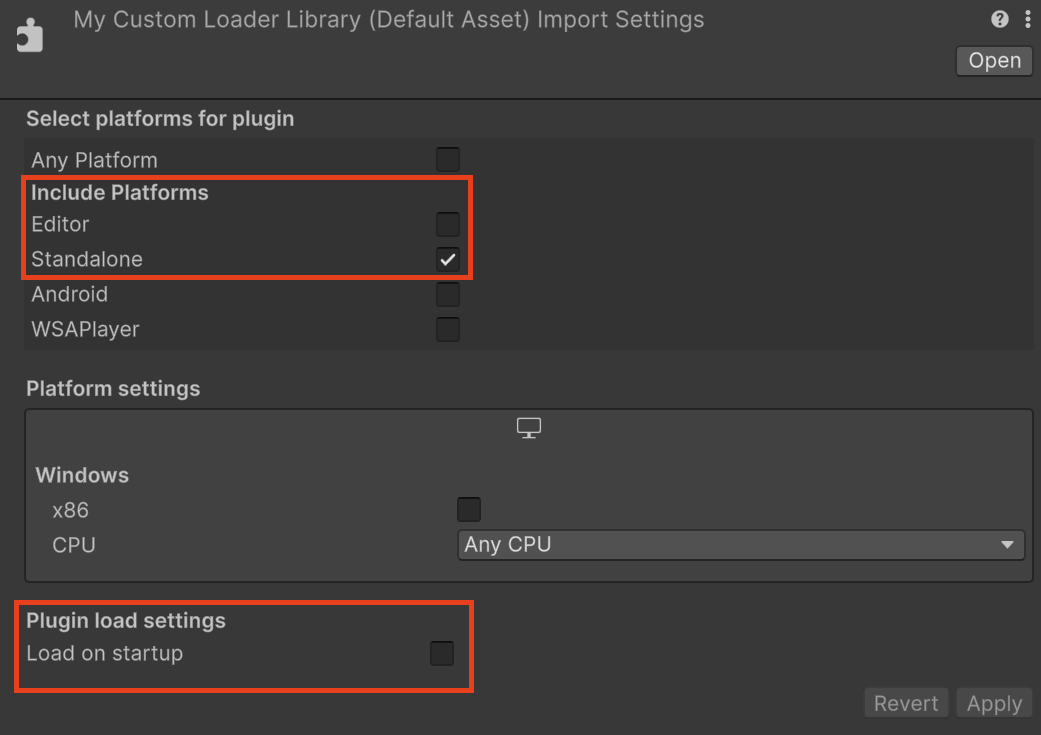
If you intend to use your custom OpenXR loader library for the Editor or Standalone platforms, use the following import settings for your custom library:
- Under Include Platforms, the Editor option is off, and the Standalone option is on.
- Under Plugin load settings, the Load on startup option is off.
Note
The Unity OpenXR SDK loads your custom loader with a customized name when starting Play mode in the Editor, even if your custom loader import settings has the Editor platform as toggled off, because the custom loader plugin is loaded by the Unity OpenXR SDK native plugin instead of the Unity engine itself. Note also that the Loader library selection rules still apply, so your custom loader library may not be loaded if another one can override it by version or priority.
There are some limitations on the name that can be used:
- The custom loader name cannot be
openxr_loader. Using this name can cause conflicts with the existing default loader, or other features' custom loader that doesn't use a customized name. - The customized name for your custom loader shouldn't include the extension. The extension is defined at runtime, depending on the platform where your app is running. Adding the extension may interfere with this mechanism.
- The name cannot be customized per build target. All custom loaders provided by your feature need to use the same name.
Important
In Android, the custom loader name applies only to the Android Archive (AAR) file that contains the Shared Object (SO) file that is OpenXR loader library. The name of the loader's SO file inside the AAR file must contain openxr_loader to be loaded at runtime.