XR Poke Interactor
Interactor used for interacting with interactables through poking, typically with a point in front of a handheld XR controller or a fingertip.
Base properties
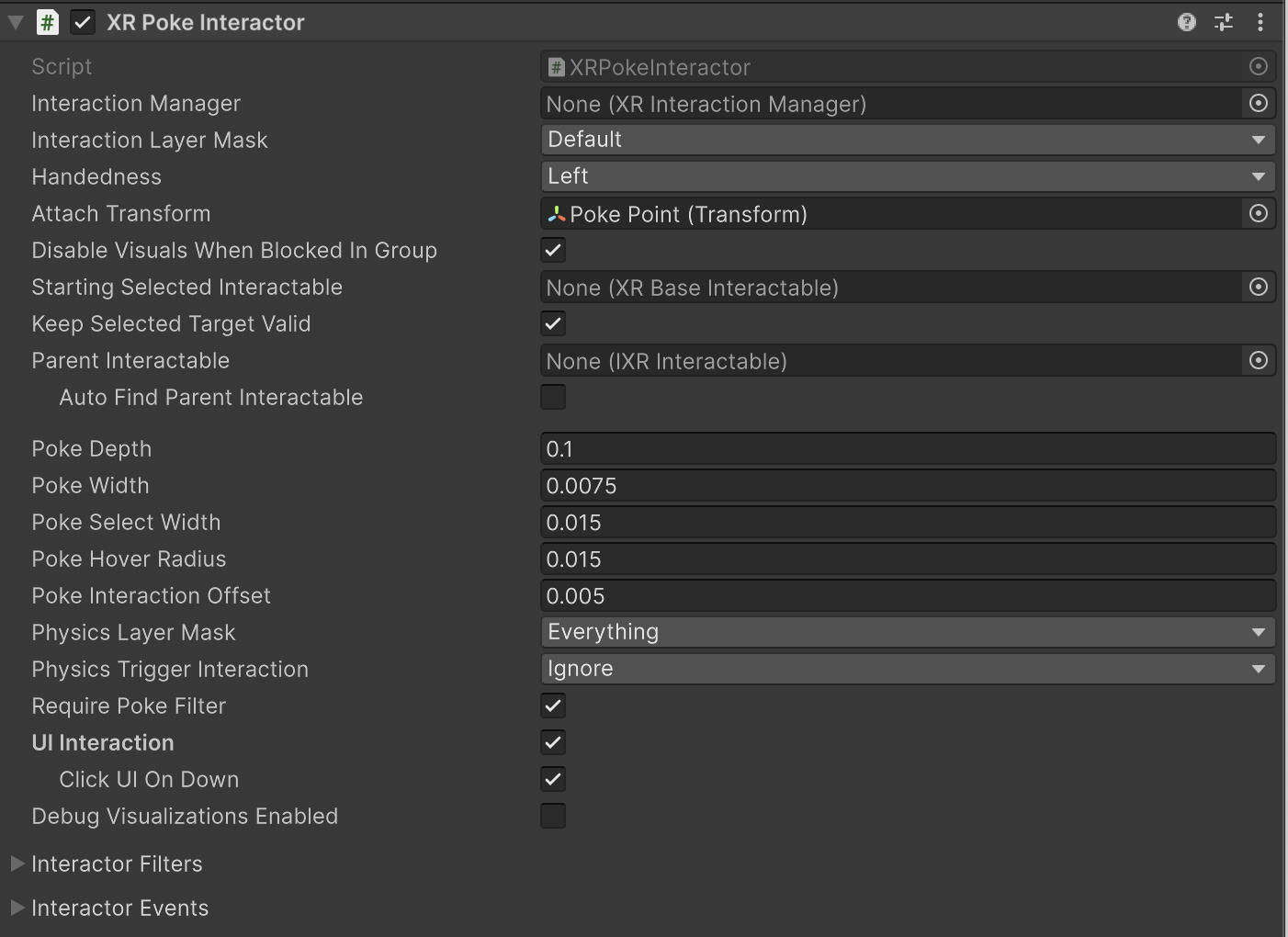
| Property | Description |
|---|---|
| Interaction Manager | The XRInteractionManager that this interactor will communicate with (will find one if None). |
| Interaction Layer Mask | Allows interaction with interactables whose Interaction Layer Mask contains any Layer in this Interaction Layer Mask. |
| Handedness | Represents which hand or controller the interactor is associated with. |
| Attach Transform | The Transform to use as the attach point for interactables.Automatically instantiated and set in Awake if None.Setting this will not automatically destroy the previous object. |
| Disable Visuals When Blocked In Group | Whether to disable visuals when this interactor is part of an Interaction Group and is incapable of interacting due to active interaction by another interactor in the Group. |
| Starting Selected Interactable | The interactable that this interactor automatically selects at startup (optional, may be None). |
| Keep Selected Target Valid | Whether to keep selecting an interactable after initially selecting it even when it is no longer a valid target. Enable to make the XRInteractionManager retain the selection even if the interactable is not contained within the list of valid targets. Disable to make the Interaction Manager clear the selection if it isn't within the list of valid targets.A common use for disabling this is for Ray Interactors used for teleportation to make the teleportation interactable no longer selected when not currently pointing at it. |
| Parent Interactable | An optional reference to a parent interactable dependency for determining processing order of interactables. Refer to Processing interactables for more information. |
| Auto Find Parent Interactable | Automatically find a parent interactable up the GameObject hierarchy when registered with the interaction manager. Disable to manually set the object reference for improved startup performance. |
| Poke Depth | The depth threshold within which an interaction can begin to be evaluated as a poke. |
| Poke Width | The width threshold within which an interaction can begin to be evaluated as a poke. |
| Poke Select Width | The width threshold within which an interaction can be evaluated as a poke select. |
| Poke Hover Radius | The radius threshold within which an interaction can be evaluated as a poke hover. |
| Poke Interaction Offset | Distance along the poke interactable interaction axis that allows for a poke to be triggered sooner/with less precision. |
| Physics Layer Mask | Physics layer mask used for limiting poke sphere overlap. |
| Physics Trigger Interaction | Determines whether the poke sphere overlap will hit triggers. |
| Snap Volume Interaction | Whether physics cast should include or ignore hits on trigger colliders that are snap volume colliders, even if the physics cast is set to ignore triggers. |
| UI Document Trigger Interaction | Whether physics cast should include or ignore hits on trigger colliders that are UI Toolkit UI Document colliders, even if the physics cast is set to ignore triggers. |
| Require Poke Filter | Denotes whether or not valid targets will only include objects with a poke filter. |
| UI Interaction | When enabled, this allows the poke interactor to hover and select UI elements. |
| Click UI On Down | When enabled, this will invoke click events on press down instead of on release for buttons, toggles, input fields, and dropdowns. |
| Debug Visualizations Enabled | Whether to display the debug visuals for the poke interaction. The visuals include a sphere that changes to green when hover is triggered, and a smaller sphere behind it that turns green when select is triggered. |
| Interactor Filters | Identifies any filters this interactor uses to winnow detected interactables. You can create filter classes to provide custom logic to limit which interactables an interactor can interact with. Filtering occurs after the interactor has performed a raycast to detect eligible interactables. |
| Interactor Events | The events dispatched by this interactor. You can add event handlers in other components in the scene or prefab and they are invoked when the event occurs. |
Interactor Filters
Configure the starting set of filters that an interactor uses to determine which interactables are eligible for interaction. All of these filter properties are optional. If you do not assign them, the interactor uses default behavior.
Refer to Interaction filters for more information about implementing filters.
| Property | Description |
|---|---|
| Starting Target Filter | Filters the list of interactables that are eligible for interaction. |
| Starting Hover Filters list | Validates which potential hover targets are eligible for hover interaction. |
| Starting Select Filters list | Validates which potential select targets are eligible for select interaction. |
Interactor Events
You can assign listener functions for interaction events in the Inspector window and in a C# class. These events apply to interactors - objects that can interact with interactables.
The UI Hover Entered and UI Hover Exited events are not available on all interactor components. Only those interactors that implement IUIHoverInteractor and enable UI Interaction with the XR UI Input Module, such as XR Poke Interactor, will have these events.
For detailed code examples showing how to subscribe to events and work with the event arguments, refer to Handle interaction events.
| Property | Description |
|---|---|
| Hover Entered | The event that is called when this interactor begins hovering over an interactable. |
| Hover Exited | The event that is called when this interactor ends hovering over an interactable. |
| Select Entered | The event that is called when this interactor begins selecting an interactable. |
| Select Exited | The event that is called when this interactor ends selecting an interactable. |
| UI Hover Entered Event | Event triggered when a UI element is hovered over by this interactor. |
| UI Hover Exited Event | Event triggered when a UI element is no longer hovered over by this interactor. |
Note
Additional events might be available to listeners you assign in C# code. Refer to the XRBaseInteractor subclass documentation for specific information.