Simple Haptic Feedback
Play haptic impulses (vibrations) on the controller in response to specific interaction events.
Use this component with an interactor to provide tactile feedback when a user selects or hovers over an object.
The haptic feedback component works in conjunction with a Haptic Impulse Player component. You can manually assign an impulse player for this component or let it automatically find one. The haptic feedback component searches its current GameObject and parent hierarchy for an existing impulse player. If it can't find one, it creates one with default settings. You can create a single impulse player for use by multiple haptic feedback and interactor pairs, which lets you define the desired impulse player settings for all of them in one place.
Simple Haptic Feedback properties
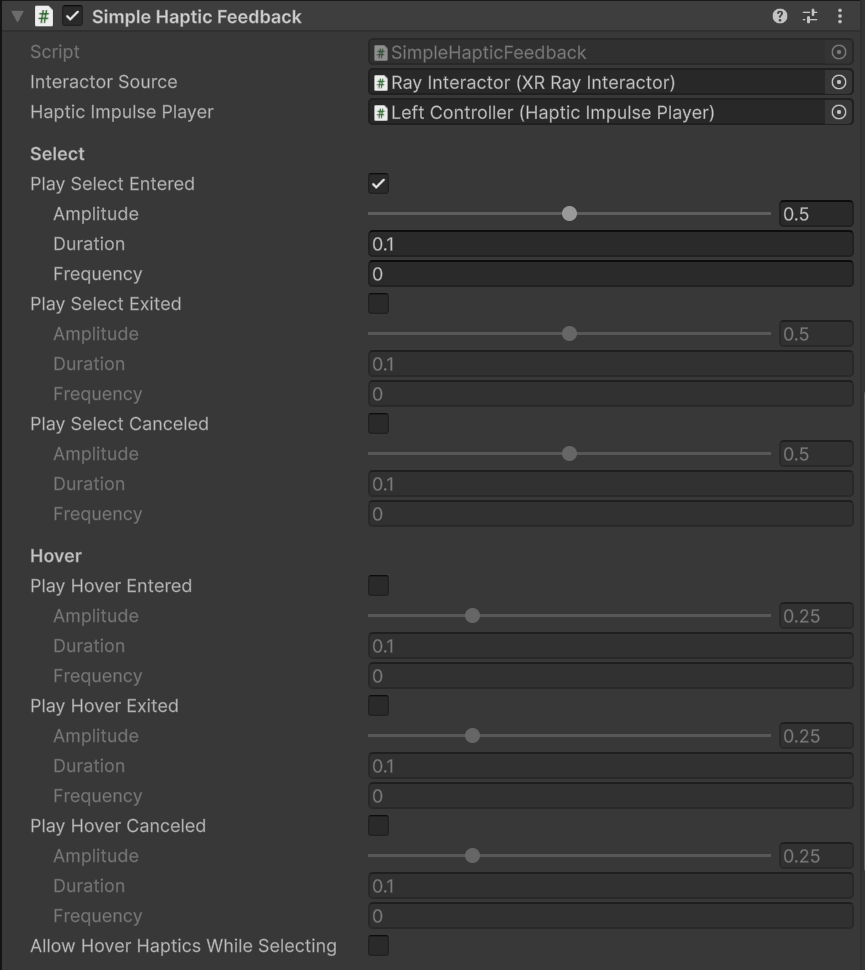
The Simple Haptic Feedback component showing all properties.
The Simple Haptic Feedback component contains the following properties:
| Property | Description |
|---|---|
| Interactor Source | The interactor component to listen to for its interaction events. |
| Haptic Impulse Player | The Haptic Impulse Player component used to play haptic impulses. If not set, the haptic feedback searches for one in its parent hierarchy and creates a new one if necessary. |
Haptic impulse settings
Each haptic event in the Select and Hover sections uses the following properties to define its vibration effect.
| Property | Description |
|---|---|
| Amplitude | The strength of the vibration as a range between 0 (minimum amplitude) and 1 (maximum amplitude). |
| Duration | The length of the vibration in seconds. |
| Frequency | The frequency (speed) of the vibration in Hz. The default value of 0 uses the default frequency of the device. |
Select
The Select section contains the following properties:
| Property | Description |
|---|---|
| Play Select Entered | Play a haptic impulse when the interactor starts selecting an interactable. |
| Play Select Exited | Play a haptic impulse when the interactor stops selecting an interactable. |
| Play Select Canceled | Play a haptic impulse when the interactor stops selecting an interactable because the interaction is canceled. |
Hover
The Hover section contains the following properties:
| Property | Description |
|---|---|
| Play Hover Entered | Play a haptic impulse when the interactor starts hovering over an interactable. |
| Play Hover Exited | Play a haptic impulse when the interactor stops hovering over an interactable. |
| Play Hover Canceled | Play a haptic impulse when the interactor stops hovering over an interactable because the interaction is canceled. |
| Allow Hover Haptics While Selecting | Allow hover haptics to play while the interactor is already selecting an interactable. |