Getting started | Package Manager UI website
docs.unity3d.com
    Show / Hide Table of Contents

    Getting started

    To start with Project Tiny and enable DOTS Mode, you must install the Project Tiny package:
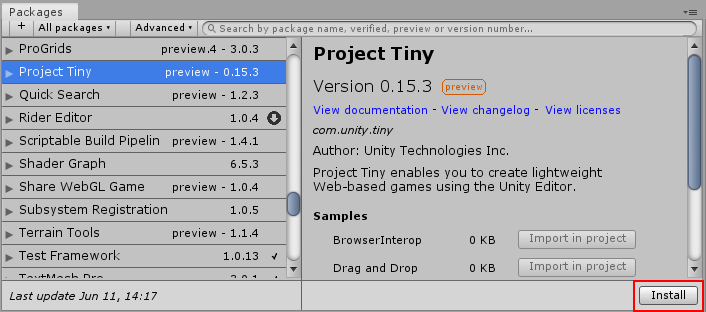
    The Install Button for Project Tiny in the Package Manager window.

    The Install Button for Project Tiny in the Package Manager window.

    See Installing the package further down in this document for details.

    Once the package is installed, you have access to the DOTS Mode workflow features, as well as a number of Project Tiny samples. The sample projects can be a useful reference for you to try out, and you can inspect the assets and source code used within.

    Back to top
    Copyright © 2023 Unity Technologies — Terms of use
    • Legal
    • Privacy Policy
    • Cookies
    • Do Not Sell or Share My Personal Information
    • Your Privacy Choices (Cookie Settings)
    "Unity", Unity logos, and other Unity trademarks are trademarks or registered trademarks of Unity Technologies or its affiliates in the U.S. and elsewhere (more info here). Other names or brands are trademarks of their respective owners.
    Generated by DocFX on 18 October 2023