Implementing the Jetpack Ability
Now that we have the Jetpack Fuel stat and HUD set up, we need to implement the actual movement logic and the visual effects. We will create two scripts:
JetpackLocomotionAbility: Handles the physics of flying.JetpackAddon: Handles input, consuming fuel, playing effects, and networking visuals.
Part 1: The Jetpack Locomotion Ability
This script implements IMovementAbility to integrate with the CoreMovement system. It overrides gravity when active to allow the player to fly.
Create a new script named JetpackLocomotionAbility.cs and paste the following code:
using UnityEngine;
using Blocks.Gameplay.Core;

public class JetpackLocomotionAbility : MonoBehaviour, IMovementAbility
{
    [Header("Fuel")]
    [SerializeField] private float fuelCost = 10f;

    [Header("Movement Settings")]
    [SerializeField] private float acceleration = 15f;
    [SerializeField] private float deceleration = 25f;
    [SerializeField] private float moveSpeed = 6f;

    [Header("Jetpack Settings")]
    [SerializeField] private float flyAcceleration = 20f;
    [SerializeField] private float maxFlySpeed = 10f;

    private CoreMovement m_Motor;
    private float m_CurrentSpeed;
    private Vector3 m_LastMoveDirection;

    public int Priority => 10;
    public float StaminaCost => 0f;
    public float FuelCost => fuelCost;
    public bool IsJetpacking { get; set; }

    public void Initialize(CoreMovement motor)
    {
        m_Motor = motor;
    }

    public MovementModifier Process()
    {
        var modifier = new MovementModifier();
        HandleHorizontalMovement(ref modifier);
        HandleVerticalMovement(ref modifier);
        return modifier;
    }

    public bool TryActivate() => false;

    private void HandleHorizontalMovement(ref MovementModifier modifier)
    {
        float targetSpeed = m_Motor.InputMagnitude * moveSpeed;
        bool hasInput = m_Motor.InputMagnitude > 0.01f;
        float rate = hasInput ? acceleration : deceleration;

        m_CurrentSpeed = Mathf.MoveTowards(m_CurrentSpeed, targetSpeed, rate * Time.deltaTime);

        if (hasInput)
        {
            Vector3 inputDirection = new Vector3(m_Motor.MoveInput.x, 0.0f, m_Motor.MoveInput.y).normalized;
            m_LastMoveDirection = TransformInputDirection(inputDirection);
        }

        modifier.ArealVelocity = m_LastMoveDirection * m_CurrentSpeed;
    }

    private void HandleVerticalMovement(ref MovementModifier modifier)
    {
        if (IsJetpacking)
        {
            modifier.OverrideGravity = true;
            float currentVertical = m_Motor.VerticalVelocity;
            float newVertical = Mathf.MoveTowards(currentVertical, maxFlySpeed, flyAcceleration * Time.deltaTime);
            m_Motor.SetVerticalVelocity(newVertical);
        }
    }

    private Vector3 TransformInputDirection(Vector3 inputDirection)
    {
        if (m_Motor.directionMode == CoreMovement.MovementDirectionMode.CameraRelative)
        {
            return Quaternion.Euler(0.0f, m_Motor.TargetRotationY, 0.0f) * inputDirection;
        }

        return m_Motor.transform.rotation * inputDirection;
    }
}
Part 2: The Jetpack Addon
The Addon script acts as the controller. It listens for input, tells the JetpackLocomotionAbility when to fly, consumes fuel from CoreStatsHandler, and synchronizes effects over the network.
Create a new script named JetpackAddon.cs:
using UnityEngine;
using Unity.Netcode;
using Blocks.Gameplay.Core;

public class JetpackAddon : NetworkBehaviour, IPlayerAddon
{
    [Header("References")]
    [Tooltip("The actual locomotion ability to toggle.")]
    [SerializeField] private JetpackLocomotionAbility jetpackAbility;
    [Tooltip("Visuals object (e.g. wings/flames) to enable while flying.")]
    [SerializeField] private GameObject jetpackVisuals;

    [Header("Input Events")]
    [Tooltip("Event raised when the jetpack button is pressed.")]
    [SerializeField] private GameEvent onJetpackPressed;
    [Tooltip("Event raised when the jetpack button is released.")]
    [SerializeField] private GameEvent onJetpackReleased;

    [Header("Effects")]
    [Tooltip("Effect spawned when jetpack starts (e.g. burst).")]
    [SerializeField] private GameObject startEffectPrefab;
    [Tooltip("Ribbon/Trail effect spawned when jetpack starts.")]
    [SerializeField] private GameObject ribbonEffectPrefab;
    [Tooltip("Effect spawned when jetpack stops.")]
    [SerializeField] private GameObject stopEffectPrefab;

    [Header("Spawn Points")]
    [SerializeField] private Transform thrusterLeft;
    [SerializeField] private Transform thrusterRight;

    [Header("Camera Shake")]
    [Tooltip("Camera shake intensity on start.")]
    [SerializeField] private float shakeIntensity = 1f;
    [Tooltip("Camera shake duration on start.")]
    [SerializeField] private float shakeDuration = 0.2f;

    private CoreStatsHandler m_StatsHandler;
    private CorePlayerManager m_PlayerManager;
    private bool m_IsJetPacking;

    public void Initialize(CorePlayerManager playerManager)
    {
        m_StatsHandler = playerManager.CoreStats;
        m_PlayerManager = playerManager;
        if (jetpackAbility == null)
        {
            jetpackAbility = GetComponent<JetpackLocomotionAbility>();
        }
    }

    public void OnPlayerSpawn()
    {
        if (m_PlayerManager != null && m_PlayerManager.IsOwner)
        {
            RegisterEventListeners();
        }
    }

    public void OnPlayerDespawn()
    {
        if (m_PlayerManager != null && m_PlayerManager.IsOwner)
        {
            UnregisterEventListeners();
        }
    }

    public void OnLifeStateChanged(PlayerLifeState previousState, PlayerLifeState newState)
    {
        if (newState == PlayerLifeState.InitialSpawn || newState == PlayerLifeState.Respawned)
        {
            ResetJetpackState();
        }
    }

    private void RegisterEventListeners()
    {
        if (onJetpackPressed != null) onJetpackPressed.RegisterListener(HandlePressed);
        if (onJetpackReleased != null) onJetpackReleased.RegisterListener(HandleReleased);
    }

    private void UnregisterEventListeners()
    {
        if (onJetpackPressed != null) onJetpackPressed.UnregisterListener(HandlePressed);
        if (onJetpackReleased != null) onJetpackReleased.UnregisterListener(HandleReleased);
    }

    private void ResetJetpackState()
    {
        m_IsJetPacking = false;
        if (jetpackAbility != null)
        {
            jetpackAbility.IsJetpacking = false;
        }
    }

    private void HandlePressed()
    {
        if (!m_PlayerManager.IsOwner) return;
        if (jetpackAbility != null)
        {
            jetpackAbility.IsJetpacking = true;
            CoreDirector.RequestCameraShake()
                .WithVelocity(shakeIntensity)
                .WithDuration(shakeDuration)
                .AtPosition(transform.position)
                .Execute();
        }

        SetJetpackStateRpc(true);
    }

    private void HandleReleased()
    {
        if (!m_PlayerManager.IsOwner) return;
        if (jetpackAbility != null)
        {
            jetpackAbility.IsJetpacking = false;
        }

        SetJetpackStateRpc(false);
    }

    private void Update()
    {
        if (m_PlayerManager == null || !m_PlayerManager.IsOwner || !m_IsJetPacking || jetpackAbility == null || m_StatsHandler == null) return;

        float fuelNeeded = jetpackAbility.FuelCost * Time.deltaTime;

        if (!m_StatsHandler.TryConsumeStat(StatKeys.JetpackFuel, fuelNeeded, OwnerClientId))
        {
            HandleReleased();
        }
    }

    [Rpc(SendTo.Everyone)]
    private void SetJetpackStateRpc(bool active)
    {
        m_IsJetPacking = active;
        if (active)
        {
            SpawnEffectAtThrusters(startEffectPrefab);
            SpawnEffectAtThrusters(ribbonEffectPrefab, true);
            if (jetpackVisuals != null) jetpackVisuals.SetActive(true);
        }
        else
        {
            SpawnEffectAtThrusters(stopEffectPrefab);
        }
    }

    private void SpawnEffectAtThrusters(GameObject prefab, bool attachToThrusters = false)
    {
        if (prefab == null) return;

        Transform[] thrusters = { thrusterLeft, thrusterRight };

        foreach (var thruster in thrusters)
        {
            if (thruster != null)
            {
                var builder = CoreDirector.CreatePrefabEffect(prefab)
                    .WithPosition(thruster.position)
                    .WithRotation(thruster.rotation);

                if (attachToThrusters)
                {
                    builder.WithParent(thruster)
                        .WithScale(thruster.localScale * 0.01f);
                }

                builder.Create();
            }
        }
    }
}
Setup Instructions
- Add Components: Add both
JetpackLocomotionAbilityandJetpackAddonto [BB] PlatformerPlayer Prefab using theCoreMovementandCorePlayerManagercustom editors to easily add these capabilities, similar to how it was done in Dash Ability. Jetpack Ability handles walking and flight, so make sure to remove Jump and Walk abilities from the player to avoid stacking. - Assign References:
- In
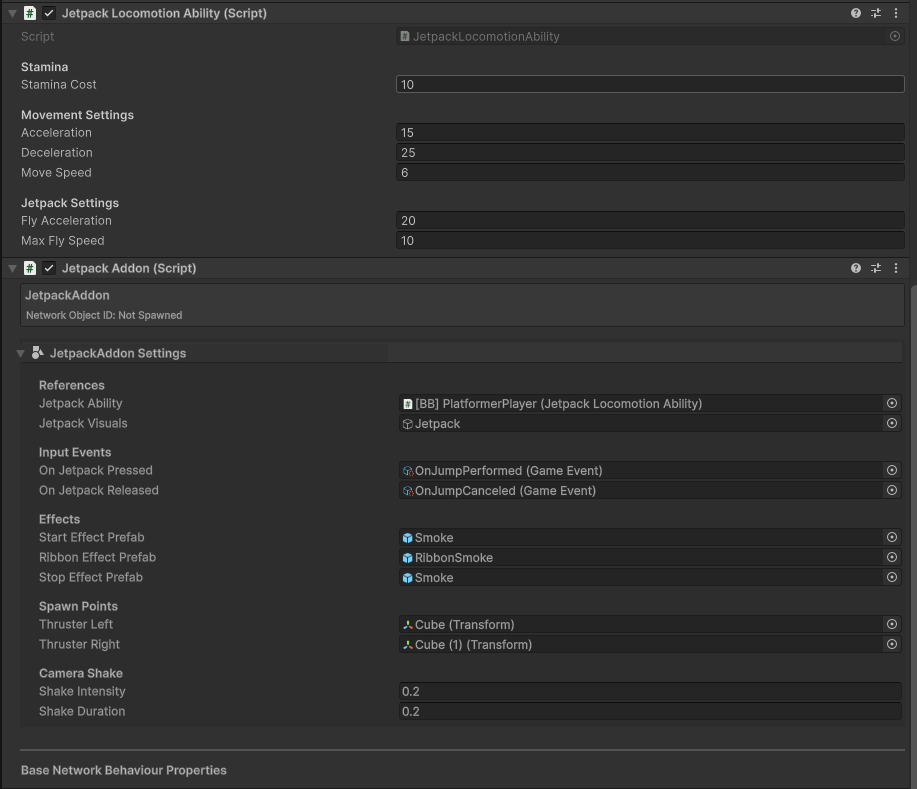
JetpackAddon, assign theJetpack Abilityfield to the component. - Assign the
On Jetpack PressedandOn Jetpack ReleasedGameEvents. - Assign the Thruster Transforms and Effect Prefabs.
- In
- Here is an example of what the configuration could look like:
Final Result
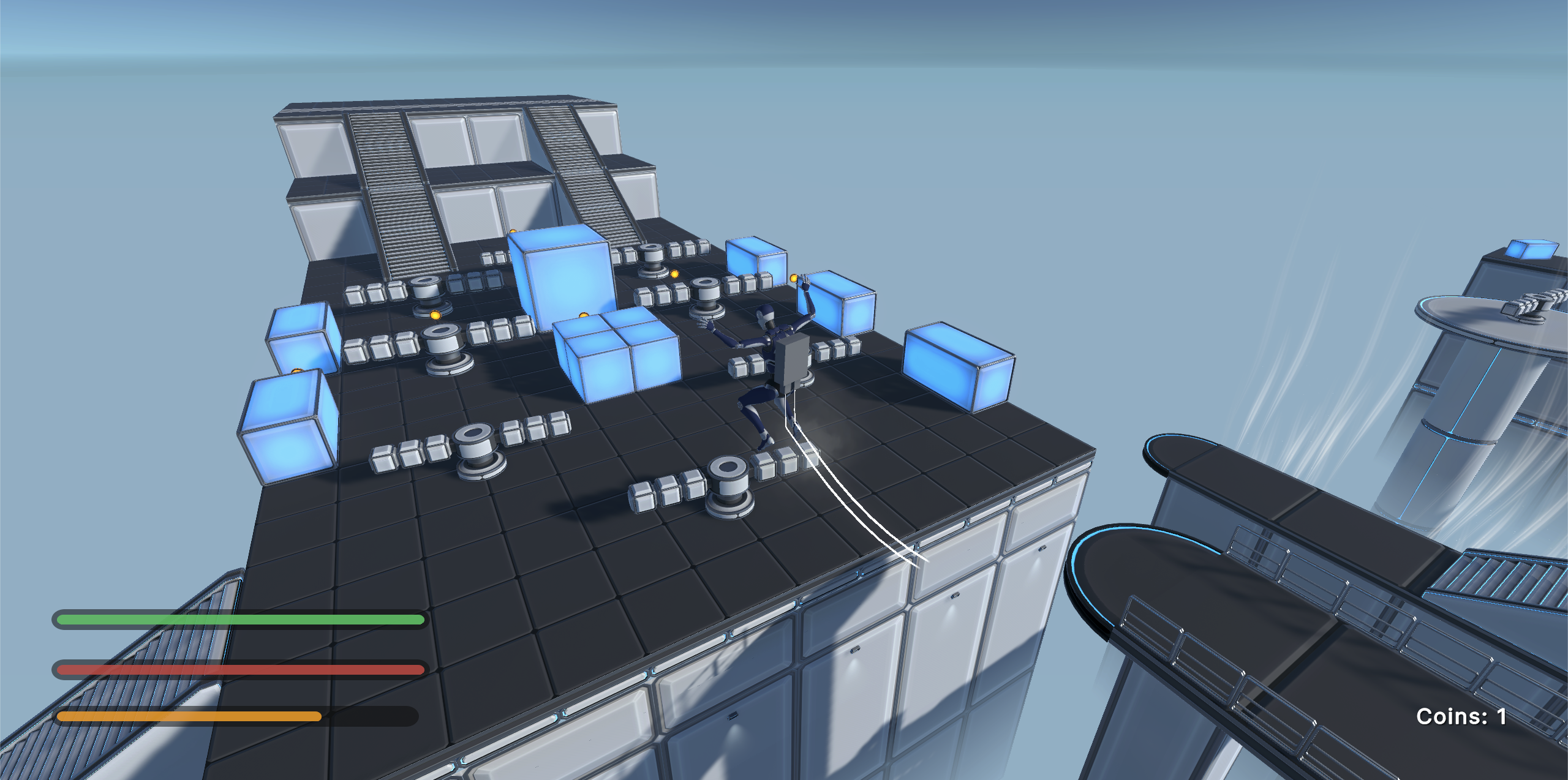
Play the game! When you press the assigned button, your character should fly up, consuming fuel. When fuel runs out, they will fall.