Creating a Dash Ability
This tutorial guides you through creating a Dash ability for your character. The Dash ability gives players a quick burst of speed, allowing them to dodge obstacles or cross gaps. We will split this into two parts: the core Dash Ability logic and the Dash Addon that handles input and resources (stamina).
Part 1: The Dash Ability Script
First, we need a script that defines how the dash works physically. This script implements IMovementAbility so it can hook into the character's movement system.
We will build this script in 3 Steps:
- The Setup: Implementing the empty interface.
- The Core Logic: Adding basic movement without extra features.
- The Full Implementation: Adding cooldowns, effects, and polish.
Step 1: The Setup (The Interface)
Create a new script named DashAbility.cs. First, we just want to ensure it connects to the system correctly.
The IMovementAbility interface requires:
- Priority: Determines which ability wins if multiple try to run (e.g., getting hit vs. dashing).
- StaminaCost: How much energy it uses.
- Initialize: Where we get references to the character motor.
- Process: Where the physics logic happens.
- TryActivate: The function we call to start the ability.
Copy this skeleton code:
using UnityEngine;
using Blocks.Gameplay.Core;

namespace Blocks.Gameplay.Platformer
{
    public class DashAbility : MonoBehaviour, IMovementAbility
    {
        // High priority (20) means this overrides standard walking/running.
        public int Priority => 20;

        // We'll calculate this later, but the system needs to know it.
        public float StaminaCost => 10f;

        public void Initialize(CoreMovement motor)
        {
            // Called when the ability is added to the character
        }

        public MovementModifier Process()
        {
            // Called every frame to apply movement forces
            // Return an empty modifier for now (no effect)
            return new MovementModifier();
        }

        // Custom method to trigger the ability
        public bool TryActivate()
        {
            return false;
        }
    }
}
Step 2: The Core Logic (Basic Movement)
Now let's make it actually move the character. We will add a timer and apply velocity.
- Variables:
dashForcefor speed,dashDurationfor time. - TryActivate: Sets
m_IsDashingto true and starts the timer. - Process: Checks if
m_IsDashingis true. If so, it overrides gravity and moves the character forward.
Update your script to this version:
using UnityEngine;
using Blocks.Gameplay.Core;

public class DashAbility : MonoBehaviour, IMovementAbility
{
    [Header("Dash Settings")]
    [SerializeField] private float dashForce = 50f;
    [SerializeField] private float dashDuration = 0.2f;

    public int Priority => 20;
    public float StaminaCost => 10f;

    private bool m_IsDashing;
    private float m_DashTimer;
    private Transform m_Transform;
    private Vector3 m_DashDirection;

    public void Initialize(CoreMovement motor)
    {
        m_Transform = motor.RotationTransform;
    }

    public MovementModifier Process()
    {
        var modifier = new MovementModifier();

        // If dashing, override movement
        if (m_IsDashing)
        {
            m_DashTimer -= Time.deltaTime;

            if (m_DashTimer <= 0)
            {
                m_IsDashing = false;
            }
            else
            {
                // Apply velocity in the dash direction
                modifier.ArealVelocity = m_DashDirection * dashForce;

                // Disable gravity during dash for consistent distance
                modifier.OverrideGravity = true;
            }
        }

        return modifier;
    }

    public bool TryActivate()
    {
        // Simple activation: Dash forward relative to the character's facing direction
        m_IsDashing = true;
        m_DashTimer = dashDuration;
        m_DashDirection = m_Transform.forward;
        return true;
    }
}
Step 3: The Full Implementation
Finally, we adding the polish:
- Cooldowns: Prevent spamming.
- Air Dashes: Check
RequireGroundedor allow limited air dashes. - Direction: Calculate direction based on Input (WASD) instead of just facing forward.
- Effects: Play particles and sound.
Replace the code with this final version.
Full Code: DashAbility.cs
using UnityEngine;
using Blocks.Gameplay.Core;

public class DashAbility : MonoBehaviour, IMovementAbility
{
    [Header("Dash Settings")]
    [SerializeField] private float dashForce = 50f;
    [SerializeField] private float dashDuration = 0.2f;
    [SerializeField] private float dashCooldown = 1.0f;
    [SerializeField] private float staminaCost = 15f;
    [SerializeField] private bool requireGrounded = false;
    [SerializeField] private bool allowAirDash = true;
    [SerializeField] private int maxAirDashes = 1;

    [Header("Effects")]
    [SerializeField] private GameObject dashStartEffect;
    [SerializeField] private SoundDef dashStartSound;

    // Higher priority overrides standard movement
    public int Priority => 20;
    public float StaminaCost => staminaCost;

    // Internal State
    private bool m_IsDashing;
    private float m_DashTimer;
    private CoreMovement m_Motor;
    private float m_CooldownTimer;
    private Vector3 m_DashDirection;
    private int m_RemainingAirDashes;

    public void Initialize(CoreMovement motor)
    {
        m_Motor = motor;
        m_Motor.OnGroundedStateChanged += OnGroundedStateChanged;
        m_RemainingAirDashes = maxAirDashes;
    }

    // The physics logic applied every frame
    public MovementModifier Process()
    {
        var modifier = new MovementModifier();

        // Handle Cooldown
        if (m_CooldownTimer > 0)
        {
            m_CooldownTimer -= Time.deltaTime;
        }

        // Handle Active Dash
        if (m_IsDashing)
        {
            m_DashTimer -= Time.deltaTime;

            if (m_DashTimer <= 0)
            {
                EndDash();
            }
            else
            {
                // Apply Dash Velocity
                modifier.ArealVelocity = m_DashDirection * dashForce;
                // Disable gravity during dash
                modifier.OverrideGravity = true;
            }
        }

        return modifier;
    }

    public bool TryActivate()
    {
        // Validation Checks
        if (m_CooldownTimer > 0 || m_IsDashing) return false;
        if (requireGrounded && !m_Motor.IsGrounded) return false;
        if (!m_Motor.IsGrounded && !allowAirDash) return false;
        if (!m_Motor.IsGrounded && m_RemainingAirDashes <= 0) return false;

        // Calculate Direction
        Vector3 dashDir = CalculateDashDirection();

        // Fallback if no input: dash forward
        if (dashDir.magnitude < 0.1f)
        {
            dashDir = m_Motor.RotationTransform != null
                ? m_Motor.RotationTransform.forward
                : m_Motor.transform.forward;
        }

        // Start Dash
        StartDash(dashDir.normalized);
        return true;
    }

    private Vector3 CalculateDashDirection()
    {
        // If there is movement input, dash in that direction relative to camera/character
        if (m_Motor.MoveInput.magnitude > 0.1f)
        {
            Vector3 inputDirection = new Vector3(m_Motor.MoveInput.x, 0.0f, m_Motor.MoveInput.y);
            switch (m_Motor.directionMode)
            {
                case CoreMovement.MovementDirectionMode.CharacterRelative:
                    return m_Motor.transform.rotation * inputDirection;
                case CoreMovement.MovementDirectionMode.CameraRelative:
                    return Quaternion.Euler(0.0f, m_Motor.TargetRotationY, 0.0f) * inputDirection;
                default:
                    return inputDirection;
            }
        }

        // Otherwise default to forward
        Transform rotationTransform = m_Motor.RotationTransform != null
            ? m_Motor.RotationTransform
            : m_Motor.transform;

        return rotationTransform.forward;
    }

    private void StartDash(Vector3 direction)
    {
        m_IsDashing = true;
        m_DashTimer = dashDuration;
        m_CooldownTimer = dashCooldown;
        m_DashDirection = new Vector3(direction.x, 0f, direction.z).normalized;

        if (!m_Motor.IsGrounded)
        {
            m_RemainingAirDashes--;
        }

        // Reset vertical velocity for a snappy dash feel
        m_Motor.SetVerticalVelocity(0f);

        // Play Effects
        if (dashStartEffect != null)
        {
            CoreDirector.CreatePrefabEffect(dashStartEffect)
                .WithPosition(m_Motor.transform.position)
                .WithRotation(Quaternion.LookRotation(m_DashDirection))
                .WithName("DashStart")
                .WithDuration(dashDuration + 0.5f)
                .Create();
        }

        if (dashStartSound != null)
        {
            CoreDirector.RequestAudio(dashStartSound)
                .AttachedTo(m_Motor.transform)
                .Play();
        }
    }

    private void EndDash()
    {
        m_IsDashing = false;
        m_DashTimer = 0f;
    }

    private void OnGroundedStateChanged(bool isGrounded)
    {
        if (isGrounded)
        {
            // Reset air dashes
            m_RemainingAirDashes = maxAirDashes;
        }
    }

    private void OnDestroy()
    {
        if (m_Motor != null)
        {
            m_Motor.OnGroundedStateChanged -= OnGroundedStateChanged;
        }
    }
}
Part 2: The Dash Addon Script
Now we need a "Manager" script to handle the player input and resources. This separates the logic of movement from the control of the player.
Create a new script named DashAddon.cs.
Key Components
- GameEvent Integration: We listen for a
GameEvent. For this example, we'll use an existing input GameEventOnPrimaryActionPressedsince we haven't set up a custom "Dash" input yet. We will cover custom inputs in Part 2. - Stamina Check: Before calling
dashAbility.TryActivate(), we check if the player has enough stamina usingStatKeys.Stamina. - Sound Feedback: If stamina is too low, we play a warning sound.
Full Code: DashAddon.cs
using UnityEngine;
using Unity.Netcode;
using Blocks.Gameplay.Core;

public class DashAddon : NetworkBehaviour, IPlayerAddon
{
    [Header("References")]
    [SerializeField] private DashAbility dashAbility;
    [SerializeField] private GameEvent onPrimaryActionPressed;

    [Header("Feedback")]
    [SerializeField] private SoundDef insufficientStaminaSound;
    [SerializeField] private float warningCooldown = 2.0f;

    private CorePlayerManager m_PlayerManager;
    private CoreStatsHandler m_StatsHandler;
    private float m_LastWarningTime;

    public void Initialize(CorePlayerManager playerManager)
    {
        m_PlayerManager = playerManager;
        m_StatsHandler = playerManager.CoreStats;
        if (dashAbility == null)
        {
            dashAbility = GetComponent<DashAbility>();
        }
    }

    // Enable input listening when player spawns
    public void OnPlayerSpawn()
    {
        if (!m_PlayerManager.IsOwner) return;
        if (onPrimaryActionPressed != null)
        {
            onPrimaryActionPressed.RegisterListener(HandleDashInput);
        }
    }

    // Cleanup when player despawns
    public void OnPlayerDespawn()
    {
        if (!m_PlayerManager.IsOwner) return;
        if (onPrimaryActionPressed != null)
        {
            onPrimaryActionPressed.UnregisterListener(HandleDashInput);
        }
    }

    public void OnLifeStateChanged(PlayerLifeState previousState, PlayerLifeState newState) { }

    private void HandleDashInput()
    {
        if (dashAbility == null)
        {
            Debug.LogWarning("[DashAddon] DashAbility component not found.", this);
            return;
        }

        float staminaCost = dashAbility.StaminaCost;
        // Get current stamina from stats system
        float currentStamina = m_StatsHandler.GetCurrentValue(StatKeys.Stamina);

        // Check Stamina
        if (currentStamina < staminaCost)
        {
            HandleInsufficientStamina();
            return;
        }

        // Attempt Dash
        if (dashAbility.TryActivate())
        {
            // Consume Stamina
            m_StatsHandler.ModifyStat(
                StatKeys.Stamina,
                -staminaCost,
                m_PlayerManager.OwnerClientId,
                ModificationSource.Consumption
            );
        }
    }

    private void HandleInsufficientStamina()
    {
        // Prevent spamming the warning sound
        if (Time.time - m_LastWarningTime < warningCooldown)
        {
            return;
        }

        m_LastWarningTime = Time.time;
        if (insufficientStaminaSound != null)
        {
            CoreDirector.RequestAudio(insufficientStaminaSound)
                .AttachedTo(transform)
                .Play(0.5f);
        }
    }
}
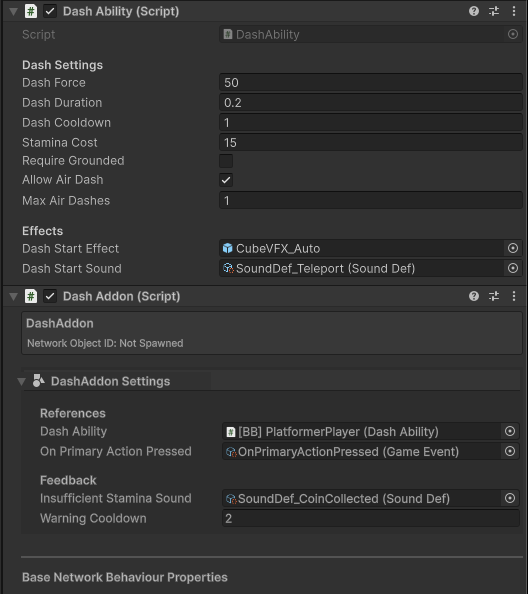
Setup Instructions
- Add Components: Add both
DashAbilityandDashAddonscripts to your Player Prefab (or a child object where other abilities reside). - Assign References:
- In
DashAddon, assign theDash Abilityfield to the component you just added. - Assign the
On Primary Action PressedGameEvent for now. In Part 2, we will create a dedicated Dash input.
- In
- Configure: Adjust
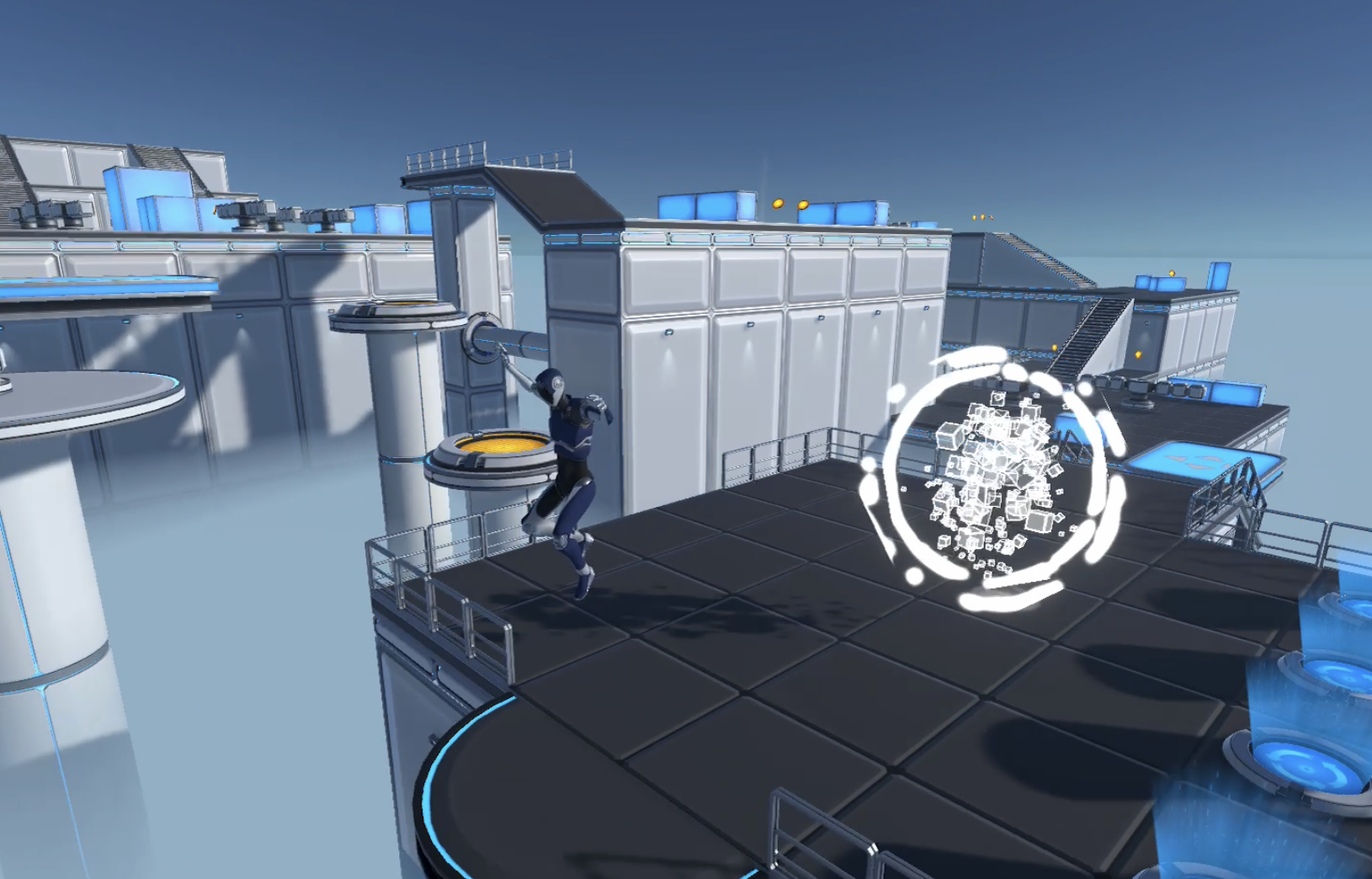
Dash ForceandStamina Costin the inspector to tune the gameplay feel. - Here's how it should look