docs.unity3d.com
    Show / Hide Table of Contents

    Project Settings

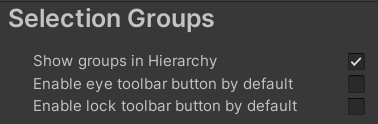
    The Selection Group item in Project Settings is used to set the following settings:

    Settings Description
    Show groups in Hierarchy Show/hide group GameObjects in the hierarchy.
    Enable eye toolbar button by default Enable eye toolbar item in the Selection Groups Window for newly created groups.
    Enable lock toolbar button by default Enable lock toolbar item in the Selection Groups Window for newly created groups.
    Back to top
    Terms of use
    Copyright © 2023 Unity Technologies — Terms of use
    • Legal
    • Privacy Policy
    • Cookies
    • Do Not Sell or Share My Personal Information
    • Your Privacy Choices (Cookie Settings)
    "Unity", Unity logos, and other Unity trademarks are trademarks or registered trademarks of Unity Technologies or its affiliates in the U.S. and elsewhere (more info here). Other names or brands are trademarks of their respective owners.
    Generated by DocFX on 18 October 2023