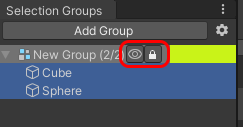
Selection Groups Overview
Introduction
Selection Groups provides a more convenient workflow in Unity by
allowing users to group a number of GameObjects under a common name.
This way, we can do operations on these groups,
instead of individual GameObjects.
Please refer to the installation page to install Selection Groups package.
Getting Started
Open the Selection Groups window via Window > General > Selection Groups.
We recommend to dock this window next to the Hierarchy window for easier member assignment.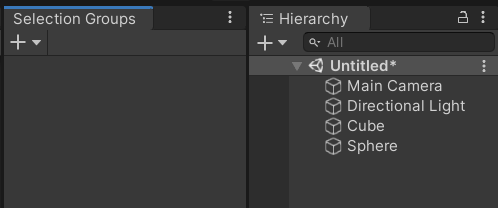
Click the
+button and select "Create Empty Group".
This will create a new item inside the window, and a new group GameObject in the Hierarchy.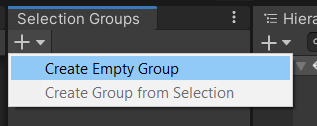
Group GameObjects can be hidden via ProjectSettings
Drag some GameObjects from the hierarchy, or assets from the Project window.
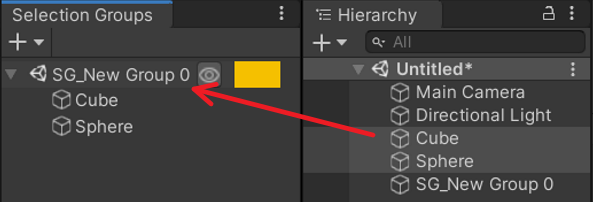
Click the group name, and the inspector window will display the following properties:
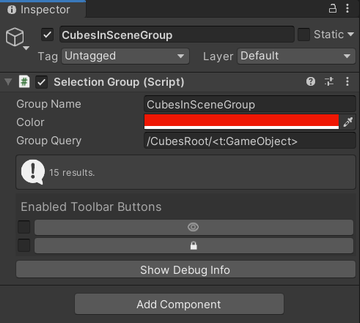
Properties Description Group name identical to the name of the group GameObject. Color The color of the group shown in the Selection Groups Window. Group Query Specifies a query which will automatically assign GameObjects from the hierarchy that match the query to the group.
See the GoQL documentation for more information.Toolbar Buttons Enables/disables the following toolbar items for the group in the Selection Groups Window.
1. Eye: to show or hide all the GameObjects in the group.
2. Lock: to enable or disable the editing of all the GameObjects in the group.