Procedural Sky
The Procedural Sky Volume component override lets you specify the type of sky that HDRP generates. For example, you can set up the sun size, ground color and sky tint.
To use this type of sky, you must first add it to a Volume and set that Volume’s Visual Environment component override’s Sky Type to Procedural Sky. For details on how to do this, see the Visual Environment documentation.
This sky is similar to the procedural sky in Unity’s built-in render pipeline. It differs as it includes extra properties that the built-in render pipeline lacks. HDRP’s Procedural Sky exposes a Multiplier, Update Mode properties, and the option to include the sun in HDRP’s baking process.
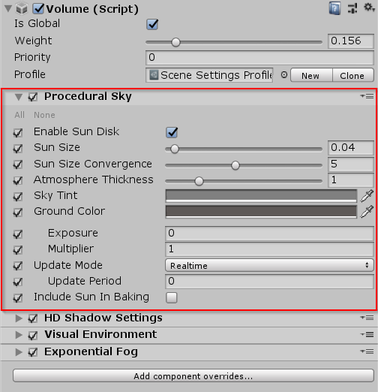
| Property | Description |
|---|---|
| Enable Sun Disk | Makes HDRP display the sun disk defined by the Sky Size, Sun Size Convergence, Exposure, and Multiplier . |
| Sun Size | The size modifier of the sun disk. |
| Sun Size Convergence | The size convergence of the sun, smaller values make the sun appear larger. |
| Atmospheric Thickness | The density of the atmosphere, an atmosphere of higher density absorbs more light. |
| Sky Tint | The color of the sky. |
| Ground Color | The color of the ground (the area below the horizon). |
| Exposure | The exposure HDRP applies to the Scene as environmental light. HDRP calculates the environment light in your Scene using 2 to the power of your Exposure value. |
| Multiplier | The multiplier HDRP applies to the Scene as environmental light. HDRP multiplies the environment light in your Scene by this value. |
| Update Mode | The rate at which HDRP updates the sky environment (using Ambient and Reflection Probes). |
| - On Changed | HDRP updates the sky environment when one of its properties change. |
| - On Demand | HDPR waits for you to manually call for a sky environment update from a script. |
| - Realtime | HDRP updates the sky environment at regular intervals defined by the Update Period. |
| - - Update Period | The period (in seconds) at which HDRP updates the sky environment when you set the Update Mode to Realtime. Set the value to 0 if you want HDRP to update the sky environment every frame. |