Visual Environment
The Visual Environment Volume component override specifies the Sky Type and Fog Type that HDRP renders in the Volume.
This Visual Environment override comes as default when you create a Scene Setting GameObject (Menu: GameObject > Rendering > Scene Settings).
Properties
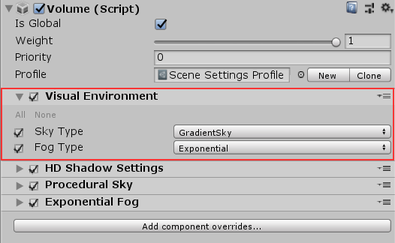
| Property | Description |
|---|---|
| Sky Type | The type of sky that HDRP renders when the Camera is inside the Volume. This list automatically updates when you write a new custom Sky. The default value is Procedural Sky. |
| Fog Type | The type of fog that HDRP renders when the Camera is inside the Volume. The default value is Exponential Fog. |
Changing sky settings
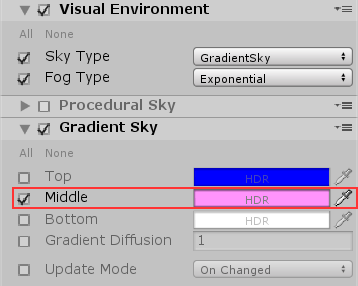
After you have set your Sky Type and Fog Type, if you want to override the default settings, you need to create an override for them on the Volume. For example, if you select Gradient Sky for your Sky Type, click Add Override on your Volume and add a Gradient Sky override. Now you can disable, or remove, the Procedural Sky override because the Visual Environment ignores it and uses the Gradient Sky instead. Disable the checkbox to the left of the Procedural Sky title to disable the override, or click the drop-down menu to the right of the title and select Remove to remove the override.
On the Gradient Sky override itself, you can enable the checkboxes next to each property to override the property with your own values. For example, enable the checkbox next to the Middle property and use the color picker to change the color to pink.