HDRI Sky
The HDRI Sky Volume component override controls settings you can use to set up an HDRI Sky. An HDRI Sky is a simple sky representation that uses a cubemap texture. This component also enables you to define how HDRP updates the indirect lighting the sky generates in the Scene.
Tip: Unity HDRI Pack is available on the Unity Asset Store and provides 7 pre-converted (1024×2014 resolution) HDR Cubemaps ready for use within your Project.
To use this type of sky. You must first add it to a Volume and set that Volume’s Visual Environment component override’s Sky Type to HDRI Sky. For details on how to do this, see the Visual Environment documentation.
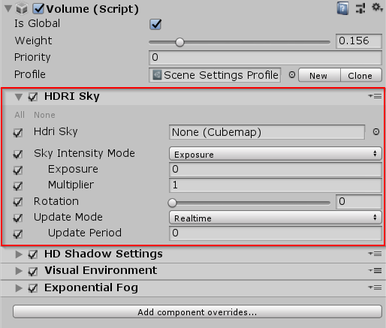
| Property | Description |
|---|---|
| HDRI Sky | Sets the cubemap HDRP uses to render the sky. |
| Sky Intensity Mode | Specifies how HDRP calculates the intensity of the environment light it applies to the Scene. |
| - Exposure | Defines the sky intensity using the Exposure and Multiplier properties. |
| - - Exposure | Sets the amount of light per unit area that HDRP applies to the HDRI Sky cubemap. |
| - - Multiplier | Multiplies the exposure that HDRP applies to the HDRI Sky cubemap. |
| - Lux | Define the sky intensity in terms of Lux values. |
| - - Desired Lux Value | Sets an absolute intensity for the HDR texture you set in HDRI Sky, in Lux, for lighting received in a direction perpendicular to the ground. This is similar to the Lux unit you use to represent the Sun and thus is complimentary. |
| - - Upper Hemisphere Lux Value | Displays the relative intensity, in Lux, for the current HDR texture set in HDRI Sky. The final multiplier HDRP applies for intensity is Desired Lux Value / Upper Hemisphere Lux Value. This field is an informative helper. |
| Rotation | Makes HDRP rotate the cubemap by this angle in degrees. |
| Update Mode | Controls the rate at which HDRP updates the sky environment (using Ambient and Reflection Probes). |
| - On Changed | Makes HDRP update the sky environment when one of its properties change. |
| - On Demand | Makes HDRP wait until you manually call for a sky environment update via a script. |
| - Realtime | Makes HDRP update the sky environment at regular intervals defined by the Update Period. |
| - - Update Period | Set the period (in seconds) at which HDRP updates the sky environment when you set the Update Mode to Realtime. Set the value to 0 if you want HDRP to update the sky environment every frame. |