Reports tab reference
Understand the layout of your package before building.
After you click the Generate Windows Layout button, use the Reports tab to explore and review the expected outcome of the packaged build. Packaging occurs as the final stage of the project build pipeline, only if you've configured packaging using Create Microsoft Store Package. For more information, refer to GDK settings for package creation (GDK Tools package documentation)
Important
Fix all detected errors before attempting a packaged build as the errors can cause makepkg.exe to fail. The system can't detect all issues automatically ahead of build time, such as those relating to language and device specifiers. Always review your layout.xml and test your packaged build.
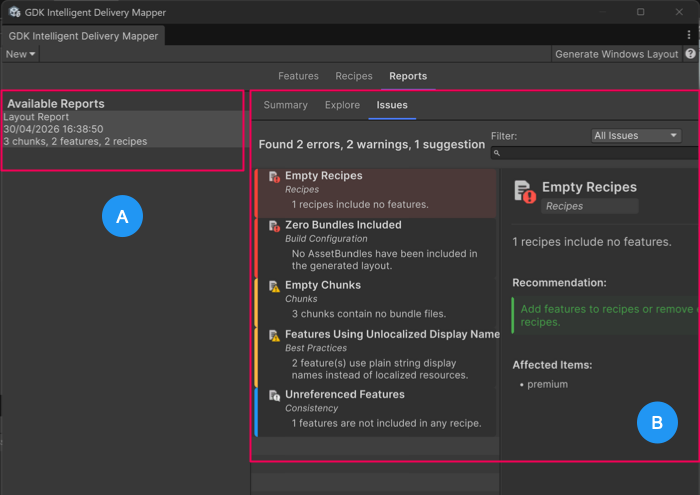 GDK Intelligent Delivery Mapper window: Reports tab interface
The Reports tab contains the following sections:
- A: Available Reports
- B: Reports detail tabs: Summary, Explore, Issues
Available Reports
This section displays the date of the layout creation and a summary of the chunks, features, and recipes included in the layout.
Reports detail tabs
| Tab | Description |
|---|---|
| Summary | Provides an overview of the layout generation, contents, and issues. |
| Explore | Displays a detailed breakdown of the final layout including the AssetBundles that each chunk contains. Use the filter dropdown to view chunks, features, or recipes individually. Use the search bar to find specific items in the filtered lists. |
| Issues | Displays warnings, errors, and suggestions to action before package creation. Use the filter dropdown to view warnings, errors, and informational suggestions individually. Important: Address all errors before you run a package build. Addressing errors at this stage saves time as the final packaging step doesn't occur until the end of the build pipeline. |