Recipes tab reference
Use the Recipes tab to associate features with recipes. Expand each recipe to display its associated features. You can view and change the properties of recipes using the Inspector panel.
You can create a recipe through the Recipe section when you open the interface for the first time or through the context menu.
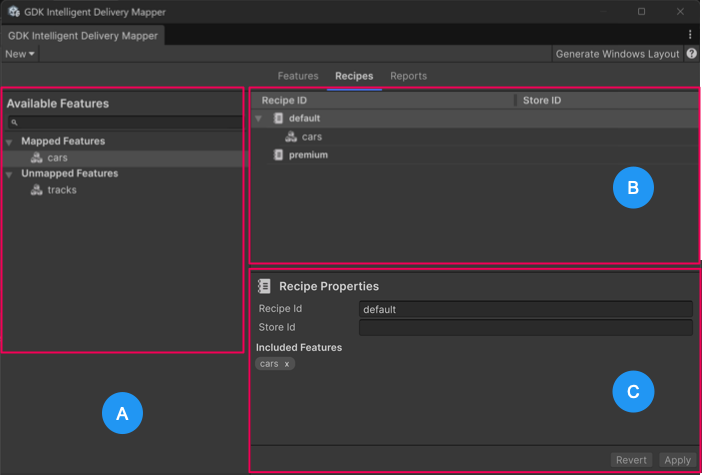 GDK Intelligent Delivery Mapper window: Recipes tab interface
The Recipes tab contains the following sections:
- A: Available Features
- B: List of recipes
- C: Inspector panel displaying Recipe properties
Available Features
The Available Features section lists the features organized into the following categories:
| Category | Description |
|---|---|
| Mapped Features | Displays features associated with an existing recipe. |
| Unmapped Features | Displays features that aren't associated with any recipe. |
Note
To unmap a feature, remove it from the recipe via the context menu.
Recipe properties reference
The Inspector panel displays the following properties when you select a recipe from the list.
| Property | Description |
|---|---|
| Recipe Id | Specifies a unique identifier for the recipe. |
| Store Id | (Optional) Specifies a unique identifier assigned to a product in the Microsoft Store. The system uses this to reference the correct store listings when defining recipes, managing installs, or resolving entitlements. Leave empty or specify one or more Store IDs in a semicolon delimited list. For example, 9PEXAMPLE001;9NEXAMPLE002. By default, this property is empty, which means the recipe is available to all users. |
| Included features | Displays tags of the features already associated with the selected recipe. |