Feature tab reference
Use the Features tab to map Addressable groups as chunks and associate those chunks with features. You can view and edit the properties of both features and chunks using the Inspector panel.
You can create a feature through the Feature section when you open the interface for the first time or through the context menu.
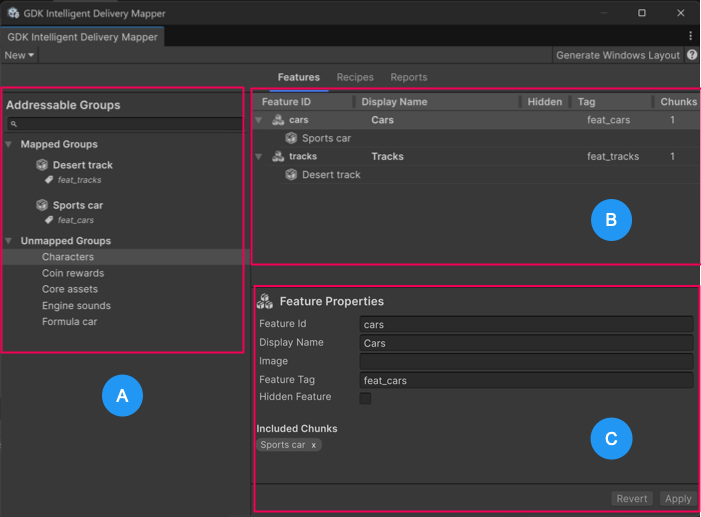 GDK Intelligent Delivery Mapper window: Features tab interface
The Features tab contains the following sections:
- A: Addressable Groups
- B: List of features with associated chunks nested under each feature
- C: Inspector panel displaying feature or chunk properties based on the selected item in the list
Addressable Groups
The Addressable Groups section lists the Addressable groups organized into the following categories:
| Category | Description |
|---|---|
| Mapped Groups | Displays Addressable groups with the Intelligent Delivery schema applied. The system automatically treats these groups as Intelligent Delivery chunks. Mapped groups represent Addressable groups that you specifically designate to function as their own Intelligent Delivery chunk. Note: You can remove the schema associated with a chunk through the context menu. |
| Unmapped Groups | Displays Addressable groups with no Intelligent Delivery schema applied. The Layout Generation setting, Include Unmapped Groups (Edit > Project Settings > Microsoft GDK > Intelligent Delivery > Layout Generation > Include Unmapped Groups) determines how the system handles Addressable groups that aren't specifically mapped to chunks. |
Feature properties reference
The Inspector panel displays the following properties when you select a feature from the list.
| Property | Description |
|---|---|
| Feature Id | Specifies an identifier that uniquely references a feature in the layout XML file. Recipes use Feature Ids to indicate which features are included in the recipe. |
| Display Name | Defines the feature name presented to users in the Xbox system interface. It is recommended to specify it as an ms-resource string that references a localized key-value pair in your Shell Visuals resources using .resw files per locale. For more information, refer to Microsoft GDK Tools package documentation on Localize your application. |
| Image | Defines the file path to the Shell Visuals image in the build. Managed through the Shell Visuals Resources of the GDK Tools package. |
| Feature Tag | Identifies the feature and is used to associate chunks with features through tag expressions. |
| Hidden Feature | Defines a feature as unavailable for user selection in the Xbox system interface. Use your game's API to manage such features. |
| Included Chunks | Displays the chunks currently associated with the selected feature via a tag. |
Chunk properties reference
The Inspector panel displays the following chunk properties when you expand a feature in the list and select a chunk.
| Property | Description |
|---|---|
| Group name | Specifies the name of the Addressable group that is mapped to the selected chunk. |
| Launch chunk | Mark a chunk as required for game launch. Launch chunks must exist on the device before the game can start. |
| Languages | Instructs the system to only install chunks that match the configured locale on the user's device. For more information, refer to the Microsoft documentation on Intelligent Delivery: language specifiers. |
| Device | Instructs the system to only install chunks where the device specifiers match the target console configuration. By default, chunks target all devices. Note: Specifying PC only chunks is currently not supported. |