Select a notification behavior
You can use the Behavior property in the Inspector to determine how a PlayerInput component notifies game code when something related to the player has occurred.
The following options are available:
| Behavior value (UI) | Description | Matching enum value |
|---|---|---|
| Send Messages | Uses GameObject.SendMessage on the GameObject that the PlayerInput component belongs to. |
SendMessages |
| Broadcast Messages | Uses GameObject.BroadcastMessage on the GameObject that the PlayerInput component belongs to. This broadcasts the message down the GameObject hierarchy. |
BroadcastMessages |
| Invoke Unity Events | Uses a separate UnityEvent for each individual type of message. When this is selected, the events available on the PlayerInput are accessible from the Events foldout. The argument received by events triggered for Actions is the same as the one received by started, performed, and canceled callbacks.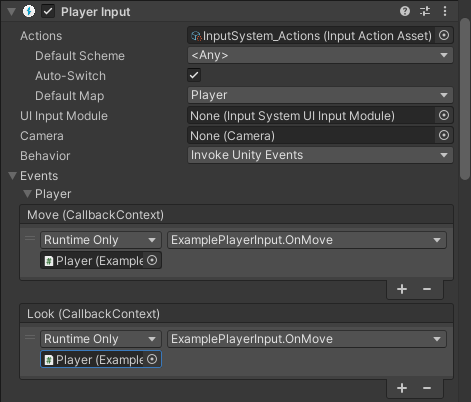 |
InvokeUnityEvents |
| Invoke CSharp Events | Similar to Invoke Unity Events, except that the events are plain C# events available on the PlayerInput API. You cannot configure these from the Inspector. Instead, you have to register callbacks for the events in your scripts.The following events are available:
|
InvokeCSharpEvents |
In addition to per-action notifications, PlayerInput sends the following general notifications:
| Notification | Description |
|---|---|
DeviceLostMessage |
The player has lost one of the Devices assigned to it. This can happen, for example, if a wireless device runs out of battery. |
DeviceRegainedMessage |
Notification that triggers when the player recovers from Device loss and is good to go again. |