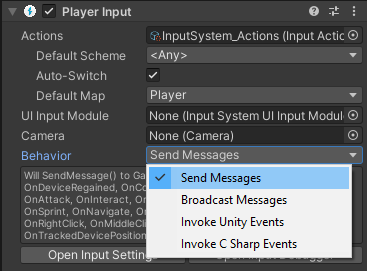
Get started with the Player Input component
To get started using the Player Input component, use the following steps:
- Add a Player Input component to a GameObject. This would usually be the GameObject that represents the player in your game.
- Assign your action asset to the Actions field. This is usually the default project-wide action asset named "InputSystem_Actions"
Currently, when using project-wide actions all the action maps are enabled by default. It is advisible to manually disable them and manually enable the default map that Player Input during
Start(). - Set up Action responses, by selecting a Behavior type from the Behavior menu. The Behavior type you select affects how you should implement the methods that handle your Action responses. Refer to the notification behaviors section further down for details.