Generate C# API from actions
Input action assets allow you to generate a C# class from your action definitions, which allow you to refer to your actions in a type-safe manner from code.
This removes the need to manually look up Actions and action maps using their names, and also provides an easy way to set up callbacks.
Note
This is an alternative workflow to project-wide actions, and provides a different way to access the actions defined in your action asset.
To enable type-safe C# API generation:
- Select the action asset in the Project window.
- In the Inpsector window, enable the Generate C# Class option.
- Select Apply.
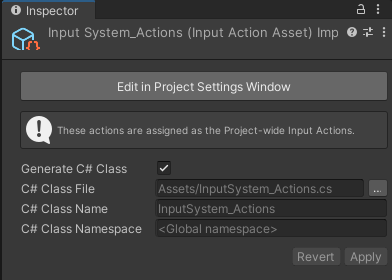
You can optionally choose a path name, class name, and namespace for the generated script, or keep the default values.
Once applied, the Input System creates a C# script containing API that matches the actions defined in the asset which you can access directly in code. The following example demonstrates this, assuming there is an action map named "gameplay" containing two actions, "use" and "move" defined in the action asset:
using UnityEngine;
using UnityEngine.InputSystem;

// IGameplayActions is an interface generated from the newly added "gameplay"
// action map, triggered by the "Generate Interfaces" checkbox. Note that if
// you change the default values for the action map, the name of the interface
// will be different.

public class MyPlayerScript : MonoBehaviour, IGameplayActions
{
    // MyPlayerControls is the C# class that Unity generated.
    // It encapsulates the data from the .inputactions asset we created
    // and automatically looks up all the maps and actions for us.
    MyPlayerControls controls;

    public void OnEnable()
    {
        if (controls == null)
        {
            controls = new MyPlayerControls();
            // Tell the "gameplay" action map that we want to be
            // notified when actions get triggered.
            controls.gameplay.SetCallbacks(this);
        }
        controls.gameplay.Enable();
    }

    public void OnDisable()
    {
        controls.gameplay.Disable();
    }

    public void OnUse(InputAction.CallbackContext context)
    {
        // 'Use' code here.
    }

    public void OnMove(InputAction.CallbackContext context)
    {
        // 'Move' code here.
    }

}
Note
To regenerate the .cs file, right-click the .inputactions asset in the Project Browser and select Reimpor.