Control hierarchies
Controls can be arranged in hierarchies. The root of a control hierarchy is always a device. You can find examples of hierarchies when browsing controls in the Path dropdown menu of the Binding properties panel.
For example, the Dpad control of a gamepad has a has child controls of left, right, up, down, and the separate horizontal and vertical 1D axes.
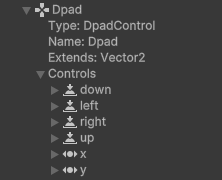
The Dpad control as viewed in the Input Debugger window, showing its child controls of down, left, right, up, x, and y.
The arrangement of control hierarchies are defined in layouts.
Access hierarchies with code
You can access the parent of a Control using InputControl.parent, and its children using InputControl.children. To access the flattened hierarchy of all Controls on a Device, use InputDevice.allControls.