Configure the Player Input Manager component
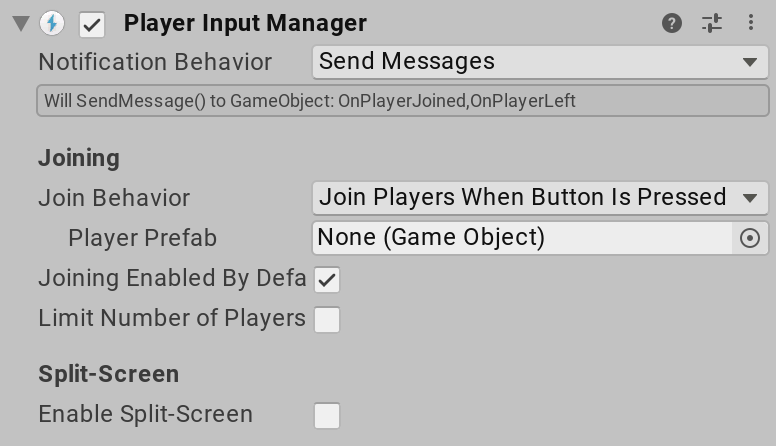
| Property | Description |
|---|---|
Notification Behavior |
How the PlayerInputManager component notifies game code about changes to the connected players. This works the same way as for the PlayerInput component. |
Join Behavior |
Determines the mechanism by which players can join when joining is enabled. See documentation on join behaviors. |
Player Prefab |
A prefab that represents a player in the game. The PlayerInputManager component creates an instance of this prefab whenever a new player joins. This prefab must have one PlayerInput component in its hierarchy. |
Joining Enabled By Default |
While this is enabled, new players can join with the mechanism determined by Join Behavior. |
Limit Number of Players |
Enable this if you want to limit the number of players who can join the game. |
Max Player Count(Only shown when Limit number of Players is enabled.) |
The maximum number of players allowed to join the game. |
Enable Split-Screen |
If enabled, each player is automatically assigned a portion of the available screen area. See documentation on split-screen multiplayer. |
Join behaviors
You can use the Join Behavior property in the Inspector to determine how a PlayerInputManager component decides when to add new players to the game. The following options are available to choose the specific mechanism that PlayerInputManager employs.
| Behavior | Description |
|---|---|
Join Players When Button IsPressed |
Listen for button presses on Devices that are not paired to any player. If a player presses a button and joining is allowed, join the new player using the Device they pressed the button on. |
Join Players When Join Action Is Triggered |
Similar to Join Players When Button IsPressed, but this only joins a player if the control they triggered matches a specific action you define. For example, you can set up players to join when pressing a specific gamepad button. |
Join Players Manually |
Don't join players automatically. Call JoinPlayer explicitly to join new players. Alternatively, create GameObjects with PlayerInput components directly and the Input System will automatically join them. |
PlayerInputManager notifications
PlayerInputManager sends notifications when something notable happens with the current player setup. These notifications are delivered according to the Notification Behavior property, in the same way as for PlayerInput.
Your game can listen to the following notifications:
| Notification | Description |
|---|---|
PlayerJoinedMessage |
A new player joined the game. Passes the PlayerInput instance of the player who joined. PlayerInputManager sends a Player Joined notification for each of these. |
PlayerLeftMessage |
A player left the game. Passes the PlayerInput instance of the player who left. |