Make a system multithreaded
This section describes how to modify a system so that it runs jobs in parallel on multiple threads.
Topics in this section are workflow steps that depend on previous steps. If you're following along in the Editor, follow the steps in order.
- Create an authoring component and a system described in the section Authoring and baking workflow. This section builds upon that example.
- Create an IJobEntity job and schedule it.
- Visualize multithreading in the Profiler.
- Read the complete code
Prerequisites
A Unity 6.X project with the following packages installed:
Optional: To follow along in the Editor, complete the steps described in Authoring and baking workflow.
Multithreading implementation overview
Consider the original single-threaded system:
public partial struct RotationSystem : ISystem
{
    // The BurstCompile attribute indicates that the method should be compiled
    // with the Burst compiler into highly-optimized native CPU code.
    [BurstCompile]
    public void OnUpdate(ref SystemState state)
    {
        // In ECS, use the DeltaTime property from Entities.SystemAPI.Time.
        float deltaTime = SystemAPI.Time.DeltaTime;

        // Create a query that selects all entities that have a LocalTransform
        // component and a RotationSpeed component.
        // In each loop iteration, the transform variable is assigned
        // a read-write reference to LocalTransform, and the speed variable is
        // assigned a read-only reference to the RotationSpeed component.
        foreach (var (transform, speed) in
                    SystemAPI.Query<RefRW<LocalTransform>, RefRO<RotationSpeed>>())
        {
            // ValueRW and ValueRO both return a reference to the actual component
            // value. The difference is that ValueRW does a safety check for
            // read-write access while ValueRO does a safety check for read-only
            // access.
            transform.ValueRW = transform.ValueRO.RotateY(
                speed.ValueRO.RadiansPerSecond * deltaTime);
        }
    }
}
This section shows how to replace the foreach loop in the OnUpdate method with code that schedules jobs to run in parallel.
Create an IJobEntity job and schedule it
First, create a job that implements the IJobEntity interface with application logic as in the single-threaded foreach loop.
Make a copy of the
RotationSystem.csfile and call itRotationSystemMultithreaded.cs. Rename the struct implementing theISysteminterface toRotationSystemMultithreaded.Create a partial struct that implements
IJobEntity. Add theExecutemethod as required by theIJobEntityinterface.Use the arguments of the
Executemethod to query for the same components as in the single-threaded system.Use the
refandinkeywords to specify which access the method requires:ref LocalTransformindicates read-write access (equivalent toRefRW<LocalTransform>).in RotationSpeedindicates read-only access (equivalent toRefRO<RotationSpeed>)
Code generation automatically creates a query based on the
Executemethod's parameters.Jobs execute asynchronously, and cannot access changing system state after scheduling. That's why there is no access to
SystemAPIinside an IJobEntity job.Define a public field
deltaTimeinside the job, so that you can set thedeltaTimevalue when scheduling the job:public float deltaTime;Implement the logic to execute on each entity in the
Executemethod. In this example it's the rotation transformation.Unlike the
foreachloop in the single-threaded system, theExecutemethod does not useRefRWorRefROwrappers, so there's no need to use theValueRWorValueROproperties. In theExecutemethod, you have direct access to the LocalTransform methods.
The job that implements the application logic is ready:
[BurstCompile]
public partial struct RotationJob : IJobEntity
{
    public float deltaTime;

    // IJobEntity generates a query for entities that have LocalTransform and
    // RotationSpeed.
    private void Execute(ref LocalTransform transform, in RotationSpeed speed)
    {
        transform = transform.RotateY(speed.RadiansPerSecond * deltaTime);
    }
}
The next step is to create a new RotationJob value in the OnUpdate method and schedule it for parallel execution.
In the
OnUpdatemethod, remove the existing code from the single-threaded implementation. Then create a newRotationJobinstance. Set thedeltaTimefield to the current frame'sSystemAPI.Time.DeltaTimevalue.Use the ScheduleParallel method to add the job instance to the job scheduler queue for parallel execution.
[BurstCompile]
public void OnUpdate(ref SystemState state)
{
    new RotationJob
    {
        deltaTime = SystemAPI.Time.DeltaTime
    }.ScheduleParallel();
}
Add the
OnCreatemethod with theRequireForUpdatemethod to ensure that the system runs only if there's at least one entity with aRotationSpeedcomponent in the scene:public void OnCreate(ref SystemState state) { // Run only when there is at least one entity with a RotationSpeed component. state.RequireForUpdate<RotationSpeed>(); }
The system is ready to run. Refer to the section Complete code for the complete code of the system.
To disable either the RotationSystem.cs or the RotationSystemMultithreaded.cs system, use the [DisableAutoCreation] attribute before the system declaration. The section Visualize multithreading in the Profiler describes how to see the effect of multithreading clearly with a simple example.
Visualize multithreading in the Profiler
To visualize jobs running in parallel in the Profiler, add a high CPU load function to the system. For example, a recursive Fibonacci number calculation.
Add a Fibonacci calculation in the
Executemethod of theRotationSystemMultithreaded.cssystem. To change the load on the CPU, change the parameter value in theFibonacci()method.// Demo CPU workload executed per entity. int fib = Fibonacci(25); int Fibonacci(int n) { if (n <= 1) return n; return Fibonacci(n - 1) + Fibonacci(n - 2); }In the Unity ECS implementation, CPU worker threads are allocated per chunk. Each chunk can have up to 128 entities. If there are less than 128 entities affected by a system, a job might run on one thread.
To ensure that you see jobs running in multiple threads, create several hundred GameObjects with the
RotationSpeedAuthoringcomponent in the ECS subscene. TheRotationSpeedAuthoringcomponent adds theRotationSpeedentity component, which the system in this section queries for.Enter Play mode.
Open Profiler and inspect a frame. The Timeline view shows multiple
RotationJobjobs running in multiple worker threads.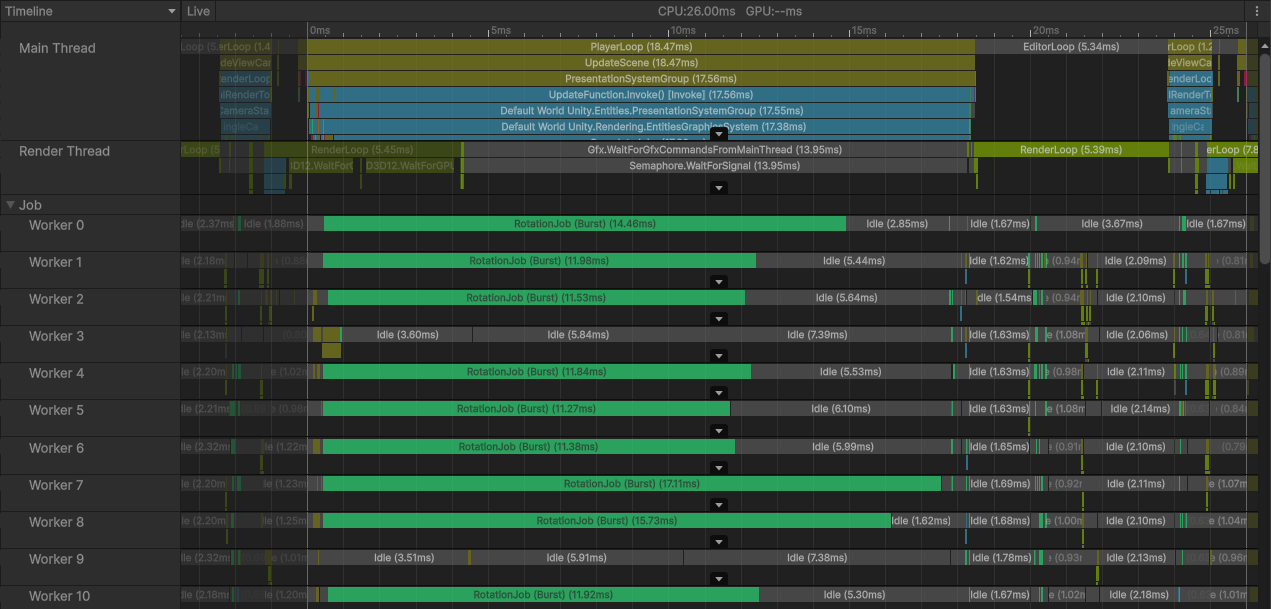
Profiler window with multiple RotationJob jobs running in parallel
Try adding the same high CPU load function to the body of the foreach loop in the single-threaded system, and use the [DisableAutoCreation] attribute on the multithreaded system. Enter Play mode and observe the difference in the performance.
Complete code
The complete code of the multithreaded system is as follows:
using Unity.Burst;
using Unity.Entities;
using Unity.Transforms;
// Multi-threaded version of RotationSystem. Schedules a Burst-compiled job that
// rotates entities and performs a demo CPU workload in parallel.
[BurstCompile]
public partial struct RotationSystemMultithreaded : ISystem
{
public void OnCreate(ref SystemState state)
{
    // Run only when there is at least one entity with a RotationSpeed component.
    state.RequireForUpdate<RotationSpeed>();
}
[BurstCompile]
public void OnUpdate(ref SystemState state)
{
new RotationJob
{
deltaTime = SystemAPI.Time.DeltaTime
}.ScheduleParallel();
}
}
[BurstCompile]
public partial struct RotationJob : IJobEntity
{
public float deltaTime;
// IJobEntity generates a query for entities that have LocalTransform and
// RotationSpeed.
private void Execute(ref LocalTransform transform, in RotationSpeed speed)
{
transform = transform.RotateY(speed.RadiansPerSecond * deltaTime);
}
}