Prefabs in baking
During the baking process, prefabs are baked into entity prefabs. An entity prefab is an entity that has the following components:
- A prefab tag: Identifies the entity as a prefab and excludes them from queries by default.
- A
LinkedEntityGroupbuffer: Stores all children within the prefab in a flat list. For example, to quickly create the whole set of entities within a prefab without having to traverse the hierarchy.
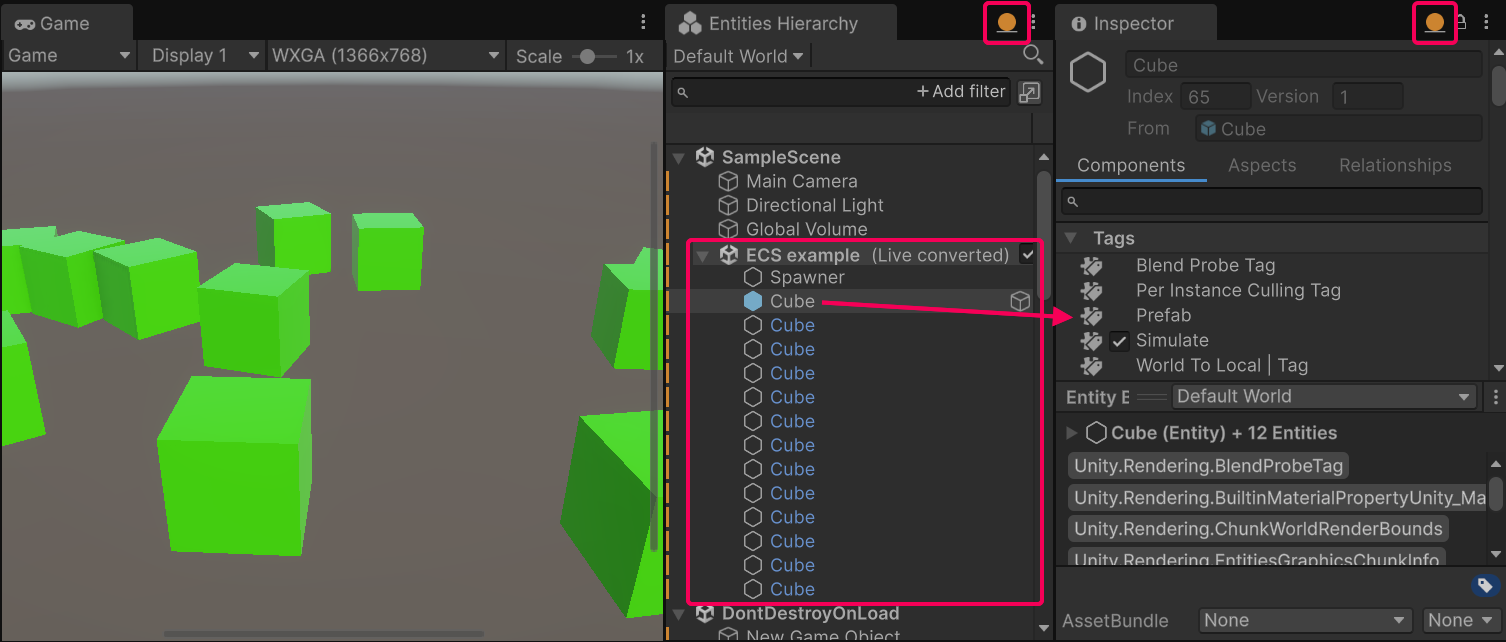
An entity prefab selected in the Hierarchy window. The Entity Inspector shows its Prefab tag, and the entities instantiated from it appear below it in the Hierarchy.
To use entity prefabs at runtime, you must bake the GameObject prefabs and make them available in the entity scene. For a step-by-step example, refer to Entity prefab instantiation workflow.
Note
When prefab instances are present in the subscene hierarchy, baking treats them as normal GameObjects because they don't have the Prefab or LinkedEntityGroup components.
Note
When a Prefab is baked, the Dynamic transform usage flag is always added to the prefab root. This ensures that the prefab entity has the required transform components for moving at runtime, for example for changing its position after instantiation.
Create and register an Entity prefab
To ensure that prefabs are baked and available in the entity scene, you must register them to a baker. This makes sure that there is a dependency on the prefab object, and that the prefab is baked and receives the proper components. When you reference the entity prefab in a component, Unity serializes the content into the subscene that uses it.
public struct EntityPrefabComponent : IComponentData
{
    public Entity Value;
}

public class EntityPrefabAuthoring : MonoBehaviour
{
    public GameObject Prefab;
}

public class EntityPrefabBaker : Baker<EntityPrefabAuthoring>
{
    public override void Bake(EntityPrefabAuthoring authoring)
    {
        // Register the Prefab in the Baker
        var entityPrefab = GetEntity(authoring.Prefab, TransformUsageFlags.Dynamic);
        // Add the Entity reference to a component for instantiation later
        var entity = GetEntity(TransformUsageFlags.Dynamic);
        AddComponent(entity, new EntityPrefabComponent() {Value = entityPrefab});
    }
}
To bake a prefab with this authoring component:
- Add the authoring component to a GameObject inside a subscene.
- In the Inspector, assign a prefab to the Prefab field of the authoring component.
Unity bakes the prefab as soon as you assign it. The entity prefab then appears under the world node in the Hierarchy window, with a blue icon:
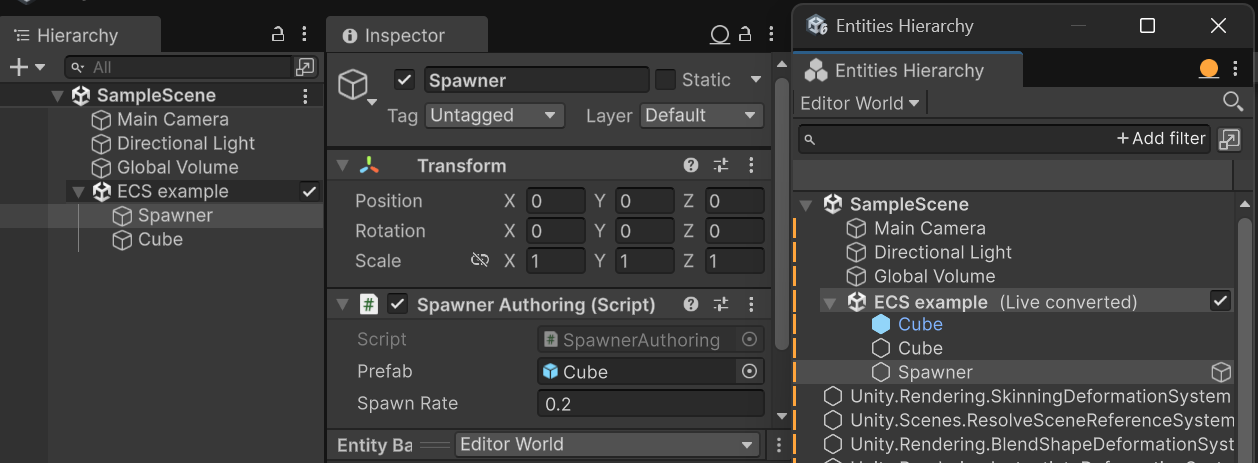
The authoring GameObject inside the ECS example subscene with the Cube prefab assigned, and the resulting Cube entity prefab under the Editor World node.
Alternatively, to reference the entity prefab during baking, use the EntityPrefabReference struct. This serializes the ECS content of the prefab into a separate entity scene file that can be loaded at runtime before using the prefab. This prevents Unity from duplicating the entity prefab in every subscene that it's used in.
public struct EntityPrefabReferenceComponent : IComponentData
{
    public EntityPrefabReference Value;
}

public class EntityPrefabReferenceAuthoring : MonoBehaviour
{
    public GameObject Prefab;
}

public class EntityPrefabReferenceBaker : Baker<EntityPrefabReferenceAuthoring>
{
    public override void Bake(EntityPrefabReferenceAuthoring authoring)
    {
        // Create an EntityPrefabReference from a GameObject. This will allow the
        // serialization process to serialize the prefab in its own entity scene
        // file instead of duplicating the prefab ECS content everywhere it is used
        var entityPrefabReference = new EntityPrefabReference(authoring.Prefab);
        var entity = GetEntity(TransformUsageFlags.Dynamic);
        AddComponent(entity, new EntityPrefabReferenceComponent() {Value = entityPrefabReference});
    }
}
Instantiate prefabs
To instantiate prefabs that are referenced in components, use an EntityManager or an entity command buffer:
// A tag component to add to each new instance
public struct Instantiated : IComponentData { }

public partial struct InstantiatePrefabSystem : ISystem
{
    public void OnUpdate(ref SystemState state)
    {
        var ecb = new EntityCommandBuffer(Allocator.Temp);

        // Get all Entities that have the component with the Entity reference
        foreach (var prefab in
                 SystemAPI.Query<RefRO<EntityPrefabComponent>>())
        {
            // Instantiate the prefab Entity
            var instance = ecb.Instantiate(prefab.ValueRO.Value);
            // Note: the returned instance is only relevant when used in the ECB
            // as the entity is not created in the EntityManager until ECB.Playback
            ecb.AddComponent<Instantiated>(instance);
        }

        ecb.Playback(state.EntityManager);
        ecb.Dispose();
    }
}
Note
Instanced prefabs will contain a SceneSection component. This could affect the lifetime of the entity.
To instantiate a prefab referenced with EntityPrefabReference, you must also add the RequestEntityPrefabLoaded struct to the entity. This is because Unity needs to load the prefab before it can use it. RequestEntityPrefabLoaded ensures that the prefab is loaded and the result is added to the PrefabLoadResult component. Unity adds the PrefabLoadResult component to the same entity that contains the RequestEntityPrefabLoaded.
public partial struct InstantiatePrefabReferenceSystem : ISystem
{
    public void OnStartRunning(ref SystemState state)
    {
        // Add the RequestEntityPrefabLoaded component to entities that have an
        // EntityPrefabReference component and load a prefab to them.
        // The PrefabLoadResult component is added to an entity once a prefab is loaded.
        // Note: it might take a few frames for the prefab to load.
        foreach (var (prefab, entity) in
                 SystemAPI.Query<RefRO<EntityPrefabReferenceComponent>>().WithNone<PrefabLoadResult>().WithEntityAccess())
        {
            state.EntityManager.AddComponentData(entity, new RequestEntityPrefabLoaded(){ Prefab = prefab.ValueRO.Value} );
        }
    }

    public void OnUpdate(ref SystemState state)
    {
        var ecb = new EntityCommandBuffer(Allocator.Temp);

        // The PrefabLoadResult component indicates that Unity loaded a prefab
        // and added it to the entity.
        // You can access the prefab from the PrefabLoadResult component and instantiate it.
        foreach (var (prefab, entity) in
                 SystemAPI.Query<RefRO<PrefabLoadResult>>().WithEntityAccess())
        {
            var instance = ecb.Instantiate(prefab.ValueRO.PrefabRoot);

            // Remove both RequestEntityPrefabLoaded and PrefabLoadResult to prevent
            // the prefab being loaded and instantiated multiple times, respectively
            ecb.RemoveComponent<RequestEntityPrefabLoaded>(entity);
            ecb.RemoveComponent<PrefabLoadResult>(entity);
        }

        ecb.Playback(state.EntityManager);
        ecb.Dispose();
    }
}
Prefabs in queries
By default, Unity excludes prefabs from queries. To include entity prefabs in queries, use the IncludePrefab field in the query. The following example queries a Turret component that a baker adds to the prefab GameObject, so both the entity prefab and its instances have that component:
// A component that a baker adds to the prefab GameObject
public struct Turret : IComponentData { }

public partial struct PrefabsInQueriesSystem : ISystem
{
    public void OnUpdate(ref SystemState state)
    {
        // Matches the entity prefab as well as the instances
        var prefabQuery = SystemAPI.QueryBuilder()
            .WithAll<Turret>().WithOptions(EntityQueryOptions.IncludePrefab).Build();
    }
}
Destroy prefab instances
To destroy a prefab instance, use an EntityManager or an entity command buffer, in the same way that you destroy an entity. Also, destroying a prefab has structural change costs.
Because queries exclude entity prefabs by default, a query that doesn't use IncludePrefab doesn't match the entity prefab. The following example destroys the instances of a prefab and leaves the entity prefab itself in place, so you can instantiate it again later. It also uses IncludeDisabledEntities, because queries exclude disabled entities by default:
public partial struct DestroyPrefabInstancesSystem : ISystem
{
    public void OnUpdate(ref SystemState state)
    {
        // Matches every instance, including disabled ones, but not the entity prefab
        var instanceQuery = SystemAPI.QueryBuilder().WithAll<Turret>()
            .WithOptions(EntityQueryOptions.IncludeDisabledEntities).Build();

        state.EntityManager.DestroyEntity(instanceQuery);
    }
}