Use case | Manage dataset versions
This use case outlines how to set up your project to access and manage dataset versions.
Prerequisites
To accomplish this use case, do the following:
- Set up a Unity scene, create
CloudWorkspaceRepositoryandStorageBehaviouras described in Use case | Manage workspaces. - Create
DatasetExamplesto access datasets as described in Use case | Manage datasets.
Manage Versions
Create VersionExamples script
- In your Unity project window, go to Assets > Scripts.
- Right-click the
Assets/Scriptsfolder. - Select Create > C# Script.
- Name your script
VersionExamples. - Update the
VersionExamplesclass to look like the following:
Add "Create version" example
To add Create version example, add following code to your VersionExamples class:
Add "List versions" example
To add List versions example, add following code to your VersionExamples class:
Add "Delete version" example
To add Delete version example, add following code to your VersionExamples class:
Add "Version metadata" example
To add Version metadata example, add following code to your VersionExamples class:
Manage Artifacts
Add "Upload file" example
- To add
Upload fileexample, add following code to yourVersionExamplesclass: - Paste the path to the file you want to upload into the
stringnamedk_FilePath. Make sure the file exists.
Add "Download file" example
- To add
Download fileexample, add following code to yourVersionExamplesclass: - Paste the path to a folder on disk into the
stringnamedk_TargetFolderPath. This folder will be used to download files to. Make sure the folder exists.
Run examples
- Replace
RunVersionsExamples()method in yourVersionExamplesclass with following code: - Replace
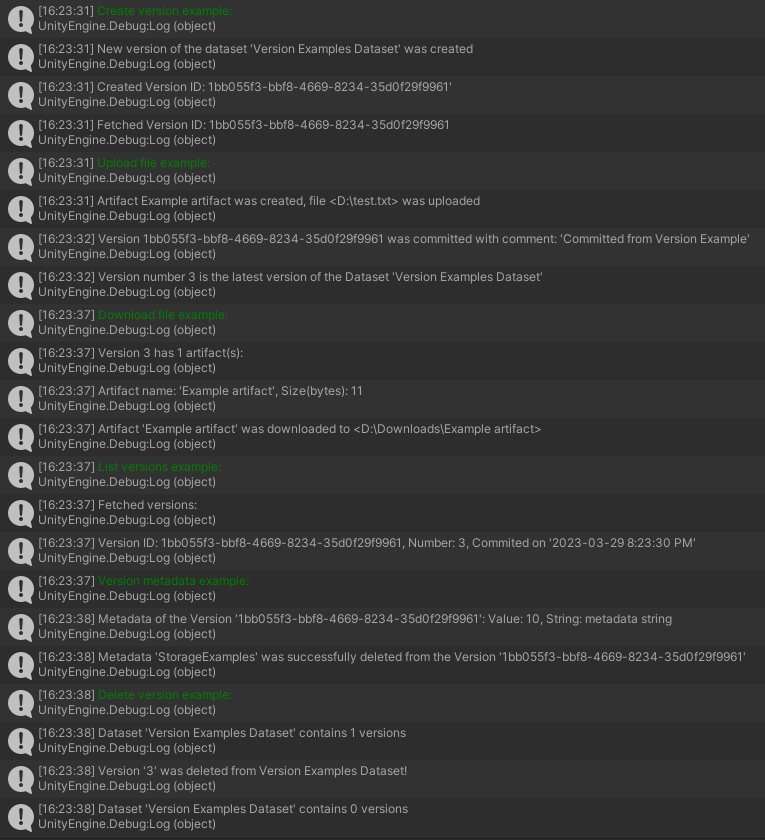
RunExamples()method in yourStorageBehaviourclass with following code: - In Unity Editor, select Play.
- Check your console to confirm that you have successfully created, listed, and deleted datasets as well as added, changed, and deleted metadata: