Sample: Authentication sample
Use the Unity Cloud Identity samples to retrieve a valid access token for a user and manage UI states. The Authentication sample outlines how to listen to Authentication state changes in your application to manage the visibility and interactabilty of GameObjects.
Prerequisites
Before you use the Unity Cloud Identity samples, make sure you have the following:
- An installed Identity package.
- A valid Unity ID account.
Install the sample
To install the sample, follow these steps:
In the Unity Editor, go to Window > Package Manager > Unity Cloud Identity.
Expand the Samples section.
Select Import next to
Authentication.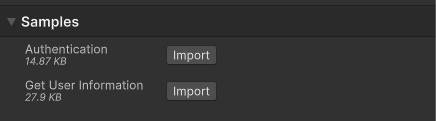
After the import process completes, you can view the imported assets under the
Assets/Samples/Unity Cloud Identityfolder.
Run the sample
To run the sample, follow these steps:
Go to
Assets/Samples/Unity Cloud Identity/<package-version>/Authentication/Scenes/AuthenticationSample.unityand run the scene.In the Game view, select Login if you are logged out.
Log into the browser window that launches with your Unity ID account.
Return to the sample scene to confirm that you are logged in.
Note
Your device stores a refresh token until you log out. This token lets the Identity service automatically attempt to log you in when you relaunch the sample.
Optionally, relaunch the sample, without logging out, to test the automatic sign-in.
Main components for the Unity Cloud Identity package samples
This section describes the scripts shared in all Identity package samples.
Platform Services script
The PlatformServices class uses the CompositeAuthenticatorSettingsBuilder class to build a list of default IAuthenticator implementations to cover the concurrent authentication flow and assign it to a CompositeAuthenticator class.
Use the following classes with the PlatformServices class:
PlatformServicesInitializationPlatformServicesShutdown
These classes use the following standard Unity Monobehaviour methods to run the initialization and shutdown methods:
Awake()Start()OnDestroy()
To open the Platform Services script, go to the Assets/Samples/Unity Cloud Identity/<package-version>/Shared/Scripts/PlatformServices.cs file.
UI Controller script
The UIController class manages the visibility and interactability of GameObjects based on the AuthenticationState and the RequiresGUI properties of the ICompositeAuthenticator interface.
The UIController gets a reference to an ICompositeAuthenticator and a IAuthenticationStateProvider interface and exposes an AuthenticationStateChanged event. The UIController uses the AuthenticationStateChanged event to update the visibility and interactability of GameObjects.
To open the UI Controller script, go to the Assets/Samples/Unity Cloud Identity/<package-version>/Shared/Scripts/UIController/UIController.cs file.
Active User Controller script
The ActiveUserController class manages the authentication of a user.
The ActiveUserController gets a reference to an ICompositeAuthenticator interface, which calls the login and logout methods and exposes an AuthenticationStateChanged event. The ActiveUserController uses the AuthenticationStateChanged event to update the state of the UI.
To open the Active User Controller script, go to the Assets/Samples/Unity Cloud Identity/<package-version>/Shared/Scripts/UIController/ActiveUserController.cs file.
AuthenticationState Updater script
The AuthenticationStateUpdater class manages the authentication state of a user.
The AuthenticationStateUpdater gets a reference to an IAuthenticationStateProvider interface and exposes an AuthenticationStateChanged event. The AuthenticationStateUpdater uses the AuthenticationStateChanged event to update the state of the UI.
To open the Active User controller script, go to the Assets/Samples/Unity Cloud Identity/<package-version>/Authentication/Scripts/AuthenticationStateUpdater.cs file.
Troubleshooting
In case of issues with the Authentication sample, refer to the troubleshooting.