Get started
This section explains how to start using the Data Streaming package.
To use the Data Streaming package, do the following:
- Verify project settings
- Install the package
- Follow the use case examples
Verify project settings
To use the Data Streaming package, you require the following:
- A Unity Editor version of 2022.3 or later. In the Unity Hub, go to Installs > Official releases to find the latest Long Term Support version.
- A Unity project that uses either the High Definition Render Pipeline (HDRP) or the Universal Render Pipeline (URP). Data Streaming's materials and shaders aren't currently compatible with the Built-In Render Pipeline.
Install the package
To install Data Streaming on a new or existing Unity project, install the Data Streaming package using the installation instructions.
Follow the use case examples
Follow this use case:
- Load a scene from the cloud: This use case explains how to stream a scene from the cloud.
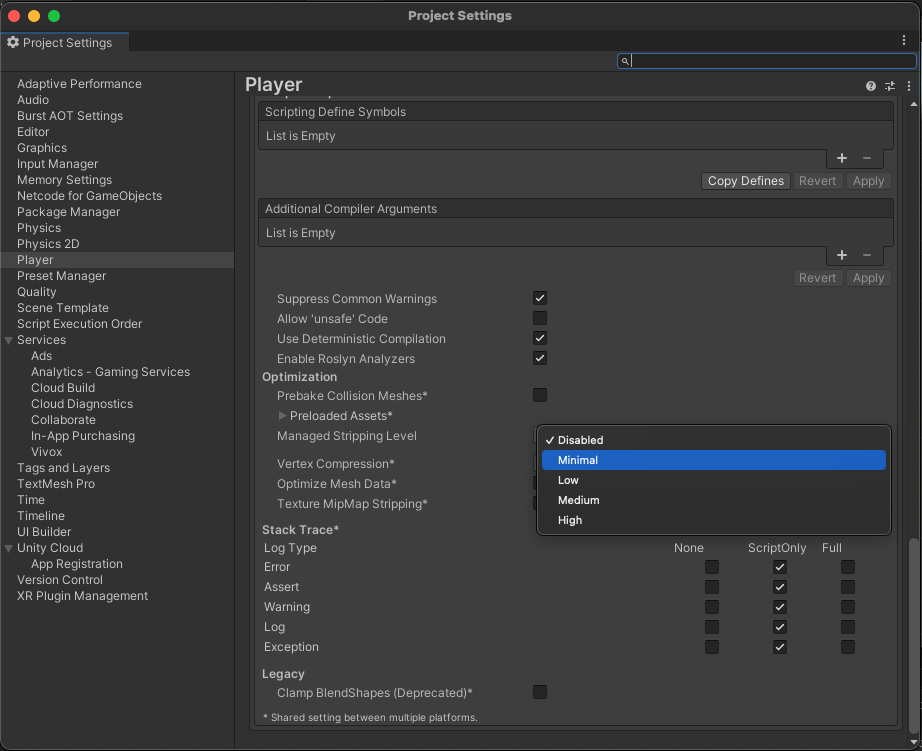
Manage the package stripping level
To avoid runtime errors when building with this package, follow these steps:
- In your Unity project window, go to Edit > Project settings.
The Project setting window opens. - Select the Player option.
- Scroll to the Additional Compiler Arguments section.
- Set the Managed stripping level option to:
- Disabled
or - Minimal (if the Disabled option isn't available)