Known issues
This page lists known issues in the Addressables package and the workarounds to resolve them.
Content Directory artifacts left behind after downgrading from Addressables 3.0.0+ break builds and the Report window
If a project ever had Addressables 3.0.0+ installed and is then downgraded to an earlier version (for example, 2.11.1), the Content Directory build script and group template introduced by 3.0.0+ remain registered in the project's Addressable Asset Settings. Earlier versions of Addressables don't support these objects, which leads to the following symptoms:
- The Content Directory group type appears as an available option when you create a new group, even though the installed version doesn't support it. Adding it logs
Cannot add null Schema objectandInvalid index for data builderwarnings. - Any Addressables build logs multiple
Object reference not set to an instance of an objecterrors (originating fromUnityEditor.GenericMenu:CatchMenu). - The Addressables Report window fails to load correctly and continuously logs errors.
To resolve these issues, remove the unsupported objects from the Addressable Asset Settings and clear the affected build reports as follows:
- Open the Addressable Asset Settings Inspector (menu: Window > Asset Management > Addressables > Settings).
- Expand the Build and Play Mode Scripts section. Select the Schema Driven Build entry, and select the − button at the bottom of the list to remove it.
- Expand the Asset Group Templates section. Select the Content Directory entry, and select the − button at the bottom of the list to remove it.
- If the Report window still logs errors, remove the affected build reports from the build report list in the left sidebar panel of the Addressables Report window. To do this, right-click in the window and select Remove Report to remove the selected report, or Remove All Reports to remove them all.
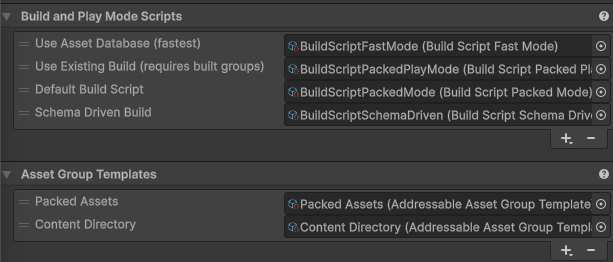
The Schema Driven Build script and Content Directory group template. Select each entry and use the − button beneath its list to remove it.