Define group settings
Use schema objects to configure group settings that control how Unity treats assets during content builds.
Group settings define how Unity treats the assets in a group in content builds. Group settings control properties such as the location where Unity creates a content build, or AssetBundle compression settings.
Schemas
A group schema is a ScriptableObject that defines a collection of settings for an Addressables group. You can assign any number of schemas to a group and also create custom schemas to support your own build scripts and utilities.
The built-in schemas are as follows:
- Content Directory: Defines the settings for building and loading Addressable assets using the content directory system. Select this option for new projects with assets that you plan on distributing locally.
- Content Packing & Loading: Defines the settings for building and loading Addressable assets using the AssetBundle system. Select this option if you're using an older project that uses AssetBundles, or you want to distribute assets remotely.
- Content Update Restrictions: Defines settings for making differential updates of an earlier build.
Note
If you use the default build script, a group must use the Content Directory or the Content Packing & Loading schema. If you use content update builds, a group must include the Content Update Restrictions schema. For more information, refer to Builds.
For information on these settings, refer to Content packing settings reference.
Change group settings
To open a group's settings, open the Addressables Groups window (Window > Asset Management > Addressables > Groups), then select a group. The group's settings are displayed in the Inspector.
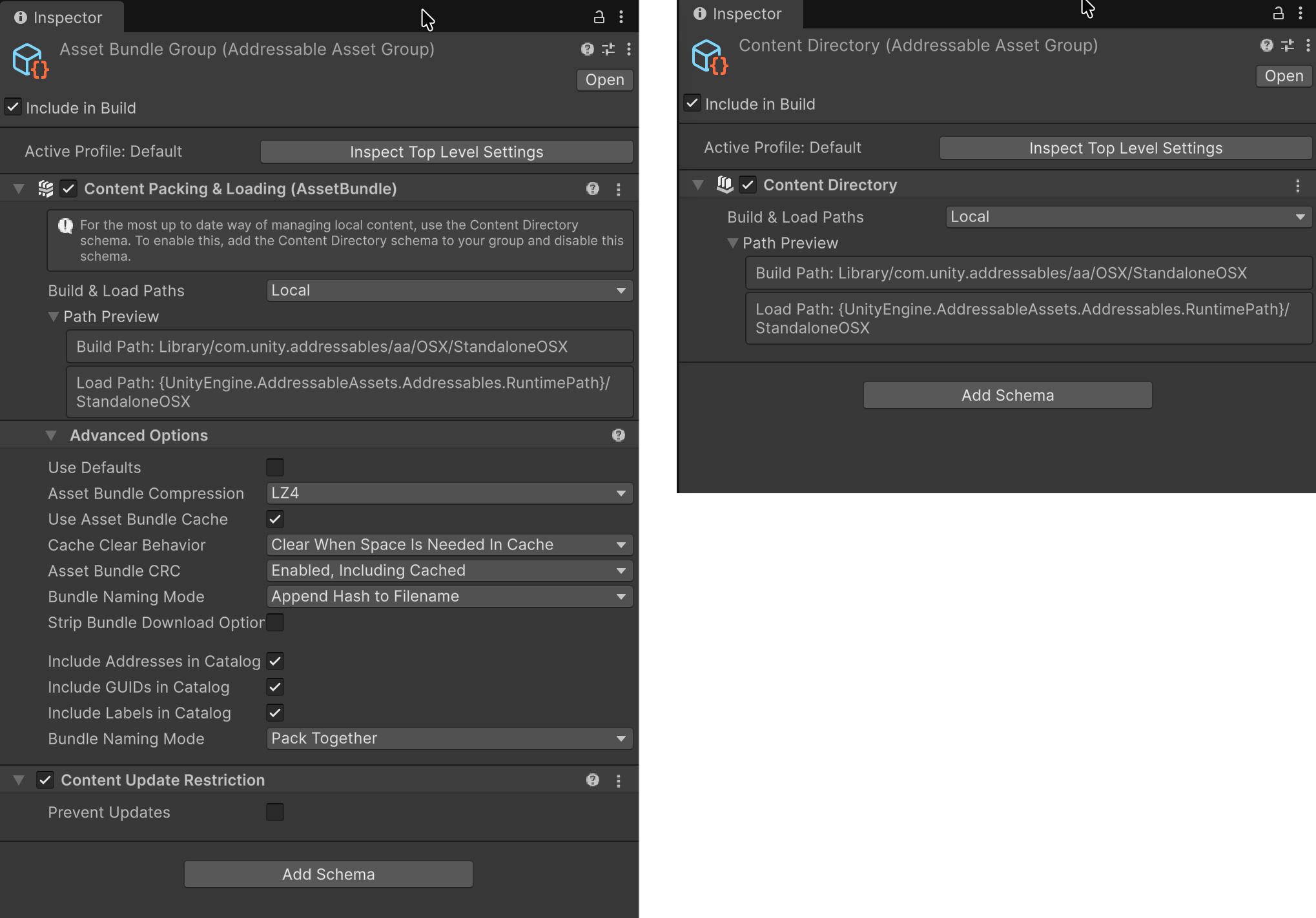
The Inspector window for a group using the Content Packing & Loading schema (left), and the Content Directory schema (right).
A group's settings are declared in schema objects attached to the group. For example, when you create a group with the Packed Assets template, the Content Packing & Loading and Content Update Restriction schemas define the settings for the group. The default Build scripts expect these settings.
Create a custom schema
To create your own schema, extend the AddressableAssetGroupSchema class, which is a kind of ScriptableObject:
using UnityEditor.AddressableAssets.Settings;

public class CustomSchema : AddressableAssetGroupSchema
{
   public string CustomDescription;
}
Once you have defined a custom schema object, you can add it to existing groups and group templates using the Add Schema button in the Inspector window.
In a build script, you can access the schema settings for a group using its AddressableAssetGroup object.