Parameters
| Parameter | Description |
|---|---|
| prop | The material property to edit. |
| label | The label to show for the property. |
Returns
float The value of the property, which might have changed if the user interacted with the control.
Description
Draws a slider for a range shader property, using automatic layout.
Use this method in a custom material editor to draw a slider for a range shader property. This overload uses automatic layout. To set the position and size of the control, use the overload that takes a Rect.
To use a custom material editor, create the editor class in a folder named Editor inside the Assets folder, then reference the class name in the shader. For example:
CustomEditor "MaterialRangePropertyExample"
The following example draws a range slider for the Glossiness property of the shader:
using UnityEngine;
using UnityEditor;

public class MaterialRangePropertyExample : MaterialEditor
{
    public override void OnInspectorGUI( )
    {
        serializedObject.Update( );
        SerializedProperty matShader = serializedObject.FindProperty( "m_Shader" );

        if( !isVisible )
            return;

        Material mat = target as Material;
        MaterialProperty Glossiness = GetMaterialProperty( new Object[] { mat }, "_Glossiness" );

        if( Glossiness == null )
            return;

        EditorGUI.BeginChangeCheck( );

        RangeProperty( Glossiness, "Glossiness" );

        if( EditorGUI.EndChangeCheck( ) )
            PropertiesChanged( );
    }
}
The following image shows the example material editor: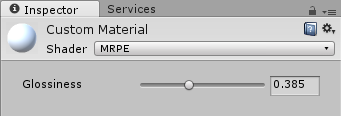
Example material editor in the Inspector window.
Parameters
| Parameter | Description |
|---|---|
| position | The position and size of the control. |
| prop | The material property to edit. |
| label | The label to show for the property. |
Returns
float The value of the property, which might have changed if the user interacted with the control.
Description
Draws a slider for a range shader property at a specified position.
Use this method in a custom material editor to draw a slider for a range shader property. This overload draws the control at position. To use automatic layout, use the overload without a Rect.
The following example uses the position parameter to set the position and size of the slider in the custom material editor:
using UnityEngine;
using UnityEditor;

public class MaterialRangePropertyWithRectExample : MaterialEditor
{
    public override void OnInspectorGUI( )
    {
        serializedObject.Update( );
        SerializedProperty matShader = serializedObject.FindProperty( "m_Shader" );

        if( !isVisible )
            return;

        Material mat = target as Material;
        MaterialProperty Glossiness = GetMaterialProperty( new Object[] { mat }, "_Glossiness" );

        if( Glossiness == null )
            return;

        EditorGUI.BeginChangeCheck( );

        RangeProperty( new Rect( 20, 60, 300, 20 ), Glossiness, "Glossiness" );

        if( EditorGUI.EndChangeCheck( ) )
            PropertiesChanged( );
    }
}
Obsolete
Use RangeProperty with MaterialProperty instead.
Declaration
public float RangeProperty(string propertyName, string label, float v2, float v3);Parameters
| Parameter | Description |
|---|---|
| propertyName | The name of the shader property. |
| label | Label for the property. |
| v2 | This parameter isn't used. |
| v3 | This parameter isn't used. |
Returns
float The value of the property, which might have been changed by the user interacting with the control.
Description
Draw a range slider for a range shader property, specified by name.
This overload is obsolete. Use MaterialEditor.RangeProperty(MaterialProperty,string) instead.