Introduction to D3D12 Device Filtering Asset
D3D12 Device Filtering Asset allows you to fine-tune which Windows devices should use the D3D12 API and define your preferred graphics jobs modes. This asset uses the following filter lists:
- Allow Filter List: Defines which Windows devices should use the D3D12 API when running Unity application.
- Deny Filter List: Defines which Windows devices shouldn’t use the D3D12 API when running Unity application.
- Preferred Graphics Jobs Filter List: Defines specific graphics jobs mode for Windows devices.
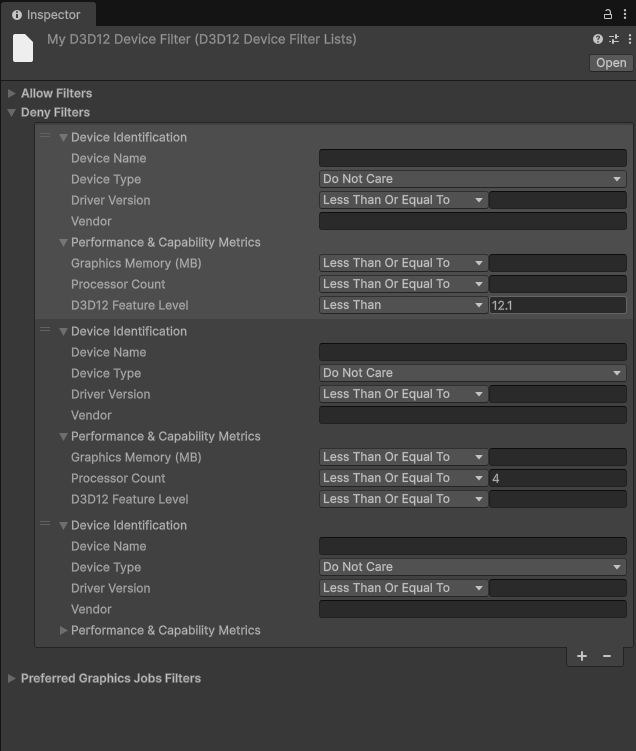
Default minimum specifications
Unity automatically applies the following specifications for D3D12 support. Devices that don’t meet these specifications don’t use D3D12 API when running Unity applications and fall back to the default graphics API configured in the Player settings. You can override these using the D3D12 Device Filtering Asset to define your custom set of criteria.
Deny Filter List
Unity restricts devices that meet any of the following specifications from using D3D12 API when running Unity applications.
-
Feature level: <
12.1 -
Processor core count: <=
4 -
Graphics memory: <
3600 MB -
Device Type:
Integrated GPUAND Vendor Name:IntelorAMD
Allow Filter List
Unity allows devices that meet all of the following specifications to use D3D12 API when running Unity applications:
-
Feature level: >=
12.2 -
Device Type:
Integrated GPU
The Allow Filter List takes priority over the Deny Filter List. If a device matches entries in both lists, Unity allows the device to use D3D12 API. For example, an Intel or AMD integrated GPU with Feature level 12.2 or higher uses D3D12 API, even though it matches an entry in the Deny Filter List.
The Allow Filter List doesn’t include discrete GPUs. Discrete GPUs use D3D12 API unless they match an entry in the Deny Filter List.
Filter list parameters
Each filter list contains a set of parameters to enter device specifications. You can add multiple entries to each filter list. Unity then allows or restricts the devices that match the specifications entered in the filter lists from using the D3D12 API and assigns any specific graphics jobs modes.
You can specify values for the following parameters to identify a device or set of devices:
- Preferred Graphics Jobs Mode
- Graphics Device Vendor
- Graphics Device Name
- Graphics Driver Version
- D3D12 Feature Level
- Graphics Memory
- Processor Count
- Graphics Device Type
The Preferred Graphics Jobs Mode parameter is available in the Preferred Graphics Jobs Filter List only.
The device properties must match all the parameter values (logical AND) to determine whether it’s allowed or denied the ability to run your application with D3D12 API and use the preferred graphics jobs mode. You can use C# regular expressions for the Graphics Device Vendor and Graphics Device Name. For example, \[I|i\]ntel .\*6\[0-9\]\[0-9\], Qual\*. The Unity Editor displays an error for an invalid regular expression. If the parameter values are set with invalid regular expressions, the application build fails.
The Allow Filter List uses your chosen comparison operators to identify devices that match the specified parameter values for driver version, D3D12 feature level, graphics memory, and processor count.
For example, if you set up the following:
- GPU Vendor: NVIDIA
- GPU Model Name: RTX 3080
- Driver Version: 347.23.0.12
- Comparison Operator: Greater Than or Equal To
In this case, the Allow Filter List includes all devices with an NVIDIA RTX 3080 GPU, and a driver version greater than or equal to 347.23.0.12
The Deny Filter List uses your chosen comparison operators to restrict devices that match the specified parameter values for driver version, D3D12 feature level, graphics memory, and processor count.
For example, if you specify:
- GPU vendor : ATI
- GPU model name : Radeon RX 9000
- Processor count : 8
- Comparison operator: Less Than Or Equal To
In this case, the Deny Filter List restricts all the devices with ATI Radeon RX 9000 GPU that have less than or equal to 8 processors.
The Preferred Graphics Jobs Filter List uses your chosen comparison operators to identify devices that match the specified parameter values for driver version, D3D12 feature level, graphics memory, and processor count in order to apply the specified graphics jobs mode.
For example:
- Graphics Jobs Mode: Native
- GPU Model Name: RTX 3080
- Driver Version: 347.23.0.12
- Comparison Operator: Less Than
In this case, the Preferred Graphics Jobs Filter List enables the Native graphics jobs mode on all devices with an RTX 3080 GPU that have a driver version less than 347.23.0.12.