Declaration
public AudioMixerGroup[] FindMatchingGroups(string subPath);Parameters
| Parameter | Description |
|---|---|
| subPath | Substring to match against group paths. |
Returns
AudioMixerGroup[] Groups in the mixer whose paths contain the specified substring.
Description
Returns mixer groups whose path contains the specified substring.
Connected groups in the mixer form a path from the mixer's master group to the leaves. This path has the format Master Group/Child of Master Group/Grandchild of Master Group, and so on.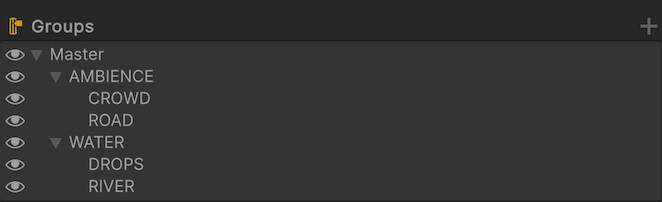
Additional resources: AudioMixer.GetFloat, AudioMixer.SetFloat, AudioMixerGroup, AudioMixer
using UnityEngine;
using UnityEngine.Audio;

public class FindMatchingMixerGroups : MonoBehaviour
{
    public AudioMixer mixer;
    const string dropsVolumeParam = "DropsVolume";

    void Start()
    {
        // Returns the group at path Master/WATER/DROPS (see hierarchy image above).
        var dropsGroup = mixer.FindMatchingGroups("DROPS")[0];

        // Returns Master/AMBIENCE/CROWD, Master/AMBIENCE/ROAD, and Master/AMBIENCE.
        var ambienceGroups = mixer.FindMatchingGroups("Master/AMBIENCE");

        // Returns ROAD and RIVER.
        var rGroups = mixer.FindMatchingGroups("/R");

        // Exposed parameters are read and written on the AudioMixer, not on AudioMixerGroup.
        if (dropsGroup.audioMixer.GetFloat(dropsVolumeParam, out float volume))
        {
            Debug.Log($"{dropsVolumeParam}: {volume}");
            dropsGroup.audioMixer.SetFloat(dropsVolumeParam, volume);
        }
    }
}