Install a UPM package from the Asset Store
Use this procedure to install UPM packages that come from the Asset Store.
For information about installing UPM packages from a registry, refer to Install a UPM package from a registry.
For information about adding asset packages (.unitypackage format) that come from the Asset Store, refer to Download and import an asset package.
For information about the differences between UPM packages and asset packages, refer to Differences between package types.
Prerequisites
Before you begin:
- Make sure you’ve acquired the package from the Asset Store. Refer to Purchase or download a package from the Asset Store.
- Make sure the package appears in the List panel of the Package Manager window when you select the My Assets context.
Procedure
-
Open the Package Manager window and select the My Assets context from the navigation panel.
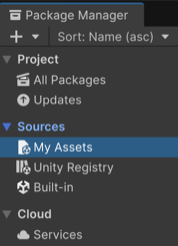
Select My Assets Select the package you want to install from the list of packages. The package information appears in the details panel.
Optional: If multiple versions are available, select the version to install. For more information on available versions, refer to Find a specific version of a package.
Select Install.
The package installs if it meets your project’s Package security settings. When the progress bar finishes, the new package is ready to use.
Note: You can install multiple packages with one click by using the multiple select feature. For more information, refer to Perform an action on multiple packages or feature sets.