Deep linking on iOS
Deep links are hyperlinks outside of your application that take a user to a specific location within the application rather than a website. When a user clicks a deep link, the application opens from the designated location, such as a specific scene in a Unity application. For more information about deep links and how to use them, refer to Deep linking.
There are two ways to enable deep links for iOS applications: URL schemes and universal links.
For information on how to use deep links and handle them when your application opens, refer to Using deep links.
URL schemes
A URL scheme specifies a link structure that your iOS application refers to. The device opens the application when the user clicks a deep link that matches the URL scheme structure. To add a URL scheme, use the following steps:
- Go to Edit > Project Settings > Player > iOS > Other Settings > Configuration.
- Expand Supported URL schemes and set the following properties:
-
Size to
1. To support multiple URL schemes, set this to the total number of schemes you want to use. -
Element 0 to the name of your URL scheme. Enter only the scheme name, without
://. For example, enterunitydlto open your application when the device processes links that start withunitydl://.
-
Size to
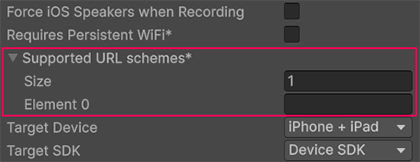
After you build and deploy your application, it opens when the device processes links that start with the URL scheme you configured.
Universal links
Universal links use https URLs. They don’t use Supported URL schemes in Unity Player settings. To set up universal links on iOS, refer to Apple’s documentation on Allowing Apps and Websites to Link to Your Content.
In Unity, universal links are handled the same way as URL schemes. When iOS opens your application from a universal link, Unity exposes the URL through Application.absoluteURL and Application.deepLinkActivated. For cold start versus running application behavior, refer to Using deep links.