Reverb Zones
Switch to Scripting
Reverb Zones take an Audio ClipA container for audio data in Unity. Unity supports mono, stereo and multichannel audio assets (up to eight channels). Unity can import .aif, .wav, .mp3, and .ogg audio file format, and .xm, .mod, .it, and .s3m tracker module formats. More info
See in Glossary and distorts it depending where the audio listener is located inside the reverb zone. They are used when you want to gradually change from a point where there is no ambient effect to a place where there is one, for example when you are entering a cavern.
Properties
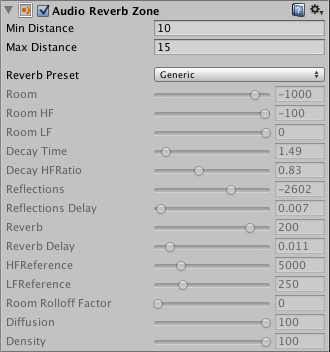
| Property: | Function: |
|---|---|
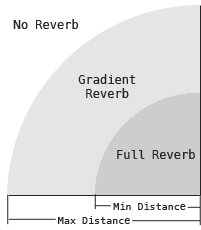
| Min Distance | Represents the radius of the inner circle in the gizmo, this determines the zone where there is a gradually reverb effect and a full reverb zone. |
| Max Distance | Represents the radius of the outer circle in the gizmo, this determines the zone where there is no effect and where the reverb starts to get applied gradually. |
| Reverb Preset | Determines the reverb effect that will be used by the reverb zone. |
Refer to Audio Reverb Filter for the rest of this component’s settings.
This diagram illustrates the properties of the reverb zone.
Hints
You can mix reverb zones to create combined effects.
AudioReverbZone