Windows Player: IL2CPP Scripting Backend
You can use IL2CPP as an alternative to Mono for scripting backend when building projects for Windows Player.
When you build a Project using IL2CPP, Unity converts IL code from scripts and assemblies to C++ before creating a native binary. See IL2CPPA Unity-developed scripting back-end which you can use as an alternative to Mono when building projects for some platforms. More info
See in Glossary for more information.
C++ source code plugins for IL2CPP
You can add C++ (.cpp) code files directly into a Unity Project when using the IL2CPP scripting backend. The C++ files act as plugins within the Plugin Inspector. If you configure the C++ files to be compatible with Windows Player, Unity compiles them together with C++ code that gets generated from managed assemblies.
To view the plugin importer settings for C++ files, click a .cpp file and select the appropriate Windows option in the Platform settings section of the Inspector:
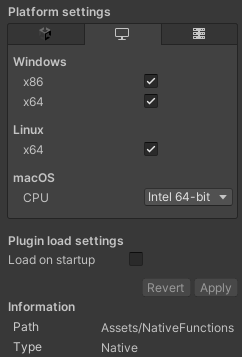
Because the functions are linked together with generated C++ code, there is no separate DLL to _P/Invoke into. Due to this, you can use the “__Internal” keyword in place of the DLL name, which makes it the C++ linker’s responsibility to resolve the functions, rather than loading them at run time, as the following example shows:
[DllImport("__Internal")]
private static extern int
CountLettersInString([MarshalAs(UnmanagedType.LPWStr)]string str);
You can define this kind of function in NativeFunctions.cpp as follows:
extern "C" __declspec(dllexport) int __stdcall CountLettersInString(wchar_t* str)
{
    int length = 0;
    while (*str++ != L'\0')
        length++;
    return length;
}
Because the linker resolves the function call, any error made in the function declaration on the managed side (C# code that executes under managed run time) produces a linker error instead of a run-time error. This means, no dynamic loading can take place during run time, and the function is called directly from C#, which significantly decreases the performance overhead of a P/Invoke call.
Unity compiles source code plug-ins with the same C++ compiler arguments as the generated C++ code, which can’t be modified. If some plug-in source code requires control over C++ compiler arguments, you must build a native plug-in instead. For more information, see Native plug-inA platform-specific native code library that is created outside of Unity for use in Unity. Allows you can access features like OS calls and third-party code libraries that would otherwise not be available to Unity. More info
See in Glossary.
IL2CPP build files
A project using the IL2CPP scripting backend typically produces these files:
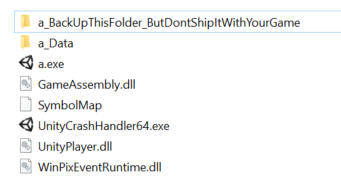
The following files are common to projects that use IL2CPP:
| File: | Description: |
|---|---|
| a_Data | Folder with game data. |
| a.exe | Main game executable. |
| UnityCrashHandler64.exe | Crash handler executable. |
| UnityPlayer.dll | Unity Player library containing all native code. |
| WinPixEventRuntime.dll | PIX for Windows runtime. This file is present only in development builds. |
| a_BackUpThisFolder_ButDontShipItWithYourGame | Folder containing data required to debug your game, including PDB (debug info) files and C++ code generated from your scripts. You should back up this folder for every build you ship, but don’t redistribute it. |
| GameAssembly.dll | Library that contains the IL2CPP runtime and all your script code. |
| SymbolMap | File containing a list of all managed function addresses and their lengths. IL2CPP needs this to resolve managed stack traces. If you delete it, you can still run your game but there’s no gurantee that exceptions will generate sensible call stacks. |