UxmlAttributeFieldDecorator
A UxmlAttributeFieldDecorator is an Editor-only container that wraps any IBindable field and adds the visual affordances required for editing UXML attributes: an override indicator bar, binding state indicators, and a context menu with override and binding actions.
Use UxmlAttributeFieldDecorator when you want to use a standard field type such as TextField or IntegerField inside a custom UxmlSerializedDataPropertyDrawer, but still want the field to participate in the override and binding system.
Visual states
The decorator changes its appearance to reflect the current state of the attribute it wraps.
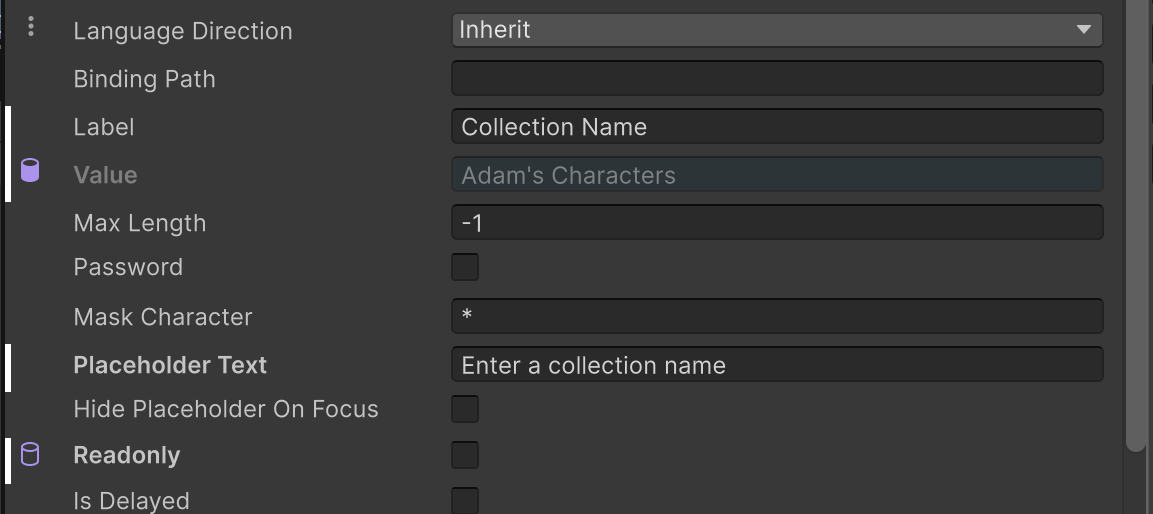
| State | Visual indicator |
|---|---|
| Default | No indicator. The field shows the inherited or default attribute value. |
| Override | A colored bar appears on the left edge, indicating the value is set inline or as a template override. |
| Data binding resolved | A binding indicator replaces the override bar, showing the attribute is driven by a successfully resolved data binding. |
| Data binding unresolved | A binding indicator is shown in a distinct style, indicating the data binding could not be resolved. |
Right-clicking the decorator opens a context menu with actions appropriate to the current state.
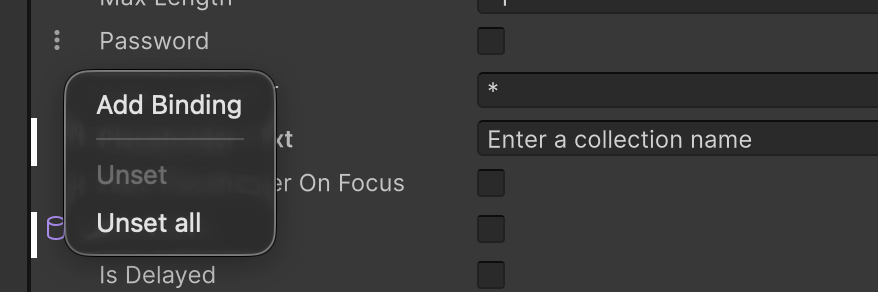
| Menu item | When available | Description |
|---|---|---|
| Add Binding | No binding | Opens the binding editor to create a data binding for this attribute. |
| Edit Binding | Binding present | Opens the binding editor to modify the existing binding. |
| Remove Binding | Binding present | Removes the data binding from this attribute. |
| Unset | Value overridden | Resets this attribute to its default value. |
| Unset all | Any override present | Resets all overridden attributes on this element to their default values. |
Create a UxmlAttributeFieldDecorator
You can create a UxmlAttributeFieldDecorator in C# or UXML. It can contain multiple child elements, but only its first IBindable direct child is bound. The decorator automatically detects that child’s binding path when it binds to a SerializedProperty.
Create with C#
using Unity.UIToolkit.Editor;
using UnityEditor;
using UnityEngine.UIElements;

// Inside a UxmlSerializedDataPropertyDrawer override:
protected override void CreateChildPropertyGUI(VisualElement container, SerializedProperty property, SerializedProperty childProperty)
{
    var decorator = new UxmlAttributeFieldDecorator();
    var textField = new TextField(childProperty.displayName)
    {
        bindingPath = childProperty.propertyPath
    };
    decorator.Add(textField);
    container.Add(decorator);
}
Create with UXML
<ui:UXML xmlns:ui="UnityEngine.UIElements" xmlns:uitke="Unity.UIToolkit.Editor">
    <uitke:UxmlAttributeFieldDecorator>
        <ui:TextField binding-path="label" label="Label" />
    </uitke:UxmlAttributeFieldDecorator>
</ui:UXML>
C# base class and namespace
C# class: UxmlAttributeFieldDecorator
Namespace: Unity.UIToolkit.Editor
Base class: VisualElement
Member UXML attributes
This element has no member UXML attributes of its own. Add any IBindable child element to wrap it with override and binding affordances.
Inherited UXML attributes
This element inherits UXML attributes from VisualElement.
USS classes
| C# property | USS selector | Description |
|---|---|---|
ussClassName |
.unity-uxml-attribute-field-decorator |
USS class name applied to every UxmlAttributeFieldDecorator instance. |
| - | .unity-uxml-attribute-field-decorator__content-container |
USS class applied to the inner content container that holds the wrapped field. |
| - | .unity-uxml-attribute-field-decorator__affordance-element |
USS class applied to the affordance element that displays override and binding indicators. |
You can also use the Matching Selectors section in the Inspector or the UI Toolkit Debugger to see which USS selectors affect the components of the VisualElement at every level of its hierarchy.