Version: Unity 6.6 Alpha (6000.6)
Language : English
Shaders view reference
Project view reference

Game Objects view reference

The Game Objects view displays information related to the GameObjectsThe fundamental object in Unity scenes, which can represent characters, props, scenery, cameras, waypoints, and more. A GameObject’s functionality is defined by the Components attached to it. More info
See in Glossary
in your project and how they impact performance. GameObjects that appear in this view can exist in a SceneA Scene contains the environments and menus of your game. Think of each unique Scene file as a unique level. In each Scene, you place your environments, obstacles, and decorations, essentially designing and building your game in pieces. More info
See in Glossary
or a PrefabAn asset type that allows you to store a GameObject complete with components and properties. The prefab acts as a template from which you can create new object instances in the scene. More info
See in Glossary
.

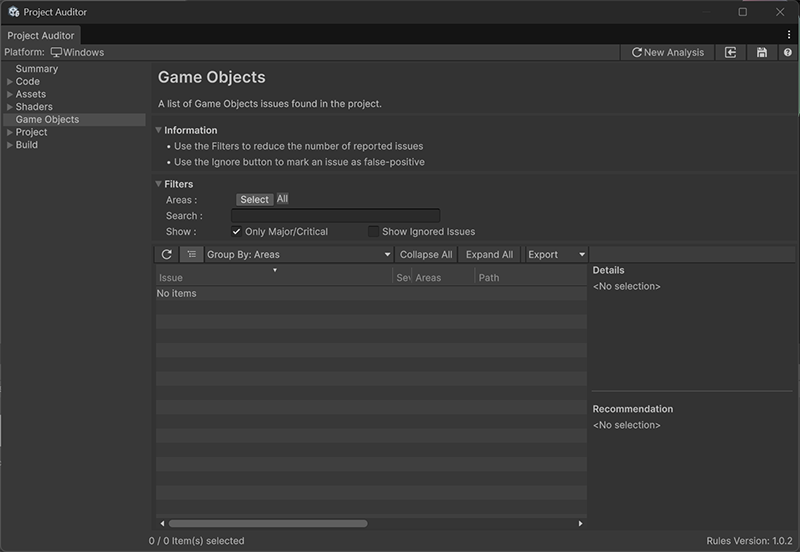
Project Auditor Game Objects view
Property Description
Areas Filter results by specific areas. The Select button opens an Areas window where you can enable the areas you’re interested in.
Search Filter the table with a string search. Type a search string into the text box and press return to display items that contain the search string.
Show Filter the results by issue type. Some views allow you to filter issues by severity. Enable or disable the checkboxes to include these issues.

Additional resources

Shaders view reference
Project view reference