Introduction to native plug-ins on iOS
An introduction to native plug-ins for iOS and their structure.
Native plug-in components
A native plug-in consists of precompiled binaries. For Apple platforms, you can use the following file types:
-
Source files: For example,
.m,.mm,.c,.cpp, or.swift -
Static libraries and frameworks: For example,
.a,.framework, or.xcframework.
Native plug-ins allow you to perform tasks that aren’t possible with C# alone. For example, you can use them to perform the following actions:
- Invoke native Apple system framework APIs.
- Integrate third-party SDKs and libraries intended for use on the target platform.
- Access platform features that aren’t exposed through a Unity API.
- Hook into the application lifecycle, the rendering pipeline, or low-level native APIs, to manage features like background modes or push notifications.
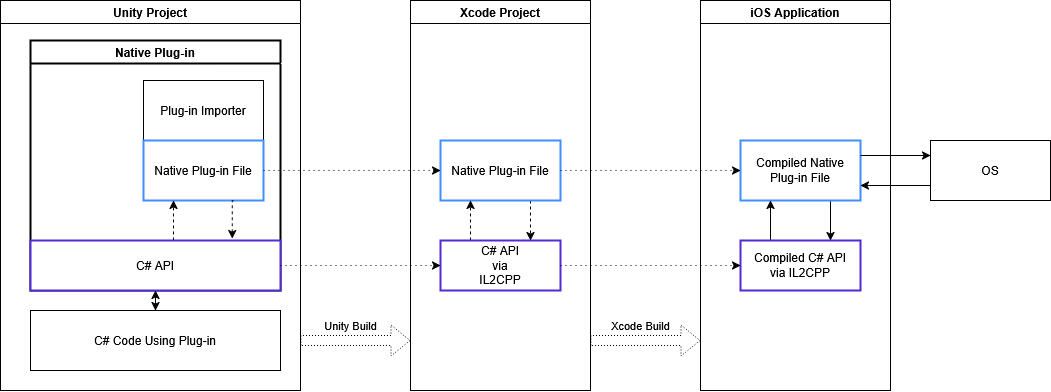
A basic native plug-in contains the following:
- Native plug-in files: The native source code or binary files.
- C# API layer: Provides the calls that connect your managed C# scripts to the native code, acting as a bridge to access the functionality of the plug-in.
Note: During the build process, Unity copies your native plug-in files (including source code, libraries, and binaries) into the generated Xcode project. Xcode then compiles any native source code and links all the plug-in files to create the final application.
The following diagram shows how these components work together:
Development considerations for native iOS plug-ins
When developing a native plug-in, you must account for multiple variations and factors to ensure broad compatibility. For example, consider the following:
- Project type: The generated Xcode project can be Objective-C or Swift.
- Platforms: Your plug-in might need to support iOS, tvOS, and visionOS platforms.
- SDK and architecture: It’s recommended to provide binaries for both device (Arm) and simulator (Intel or Arm) SDKs.
- In-Editor fallback: Provide a fallback or simulated functionality for when your code runs in the Unity Editor.
- Unity versioning: Aim to create a single plug-in that can be installed across multiple versions of Unity.
-
Initialization timing: The initialization timing of the
UnityFramework.frameworkand its global variables depends on whether you export a Swift or Objective-C Xcode project.- Swift projects: The framework initializes before the main function executes.
- Objective-C projects: The framework initializes after the main function executes.
-
Unity as a Library: To ensure your integration works correctly with different build types, support both standard Unity builds and Unity as a Library integrations. In a standard build, the
UnityFramework.frameworkis part of the generated Xcode project. In a Unity as a Library integration,UnityFramework.frameworkis embedded directly into a host application.
Additional resources
- Create a native plug-in for iOS
- Call native plug-ins for iOS
- Native plug-insA platform-specific native code library that is created outside of Unity for use in Unity. Allows you can access features like OS calls and third-party code libraries that would otherwise not be available to Unity. More info
See in Glossary