Override prefab instances
You can override the properties and components of a prefab instance to create variations between instances, while still linking those instances to the same prefab asset. For example, you might create several instances of the same character, but override its speed value, and assign a different audio clip to each instance.
When you change any of the following on a prefab instance, Unity treats it as an override:
- The values of a property.
- Adding or removing a component.
- Adding or removing a child GameObject.
If you modify or delete any scripts that declare the value of an instance override, then the override becomes unused. For information on how to remove unused override data, refer to Remove unused override data.
Appearance of overrides in the Editor
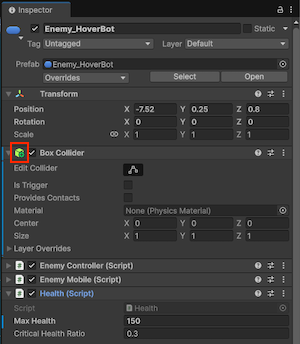
Unity indicates overrides with a blue line on the left of the Inspector window. Any added or removed components have a plus or minus badge on their icon.
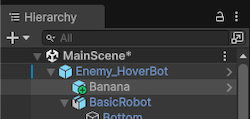
In the Hierarchy, any added objects have a plus badge on their icons.
Behavior of overrides
An overridden property value on a prefab instance always takes precedence over the value from the prefab asset. This means that if you change a property on a prefab asset, it doesn’t have any effect on instances where that property is overridden.
If you edit a prefab asset and some instances don’t update as expected, check if that property is overridden on those instances. If your project has many instance overrides, it can be hard to track which changes take effect, so consider using prefab variants for more manageable variations.
Transform overrides
A prefab instance’s Position and Rotation properties always differ from the root prefab asset’s properties and aren’t an explicit override. This is because in most projects, different prefab instances need to be at different positions and rotations to the original prefab asset, so Unity doesn’t consider this to be an override.
For a Rect Transform, the Width, Height, MarginsMinimum distance between UV charts within the same layout. Margin helps prevent texture bleeding between charts during filtering and mipmapping, and is usually specified in texels at the target resolution.
See in Glossary, AnchorsA UI layout tool that fixes a UI element to a parent element. Anchors are shown as four small triangular handles in the Scene view and anchor information is also shown in the Inspector. More info
See in Glossary and Pivot properties aren’t considered overrides.
Overrides on arrays, lists, and dictionaries
When you override an individual entry of an array, a list, or a dictionary field on a prefab instance, Unity records the override at the entry’s position in the serialized collection.
If you later change the structure of the collection on the prefab asset by adding or removing entries, the override stays at the same position. Depending on the change, the override might then apply to a different entry than the one you originally intended to override.
For example, consider a prefab that has an int[] field named scores with the values 10, 20, 30. The following scenario illustrates how an override can end up applied to a different entry than the one you intended to override:
- On a prefab instance, you override the second value to
99. The Inspector shows the instance as10,99,30, with the override marker on the second row. - On the prefab asset, you delete the first entry with value
10. The asset’s array becomes20,30. - On the instance, the override is still recorded at the same position. The Inspector now shows
20,99, with the override marker on the second row. The override originally replaced20, but it now replaces30.
For dictionary fields, the same logic applies, with an additional consideration. The Inspector displays dictionary entries in sorted order, not in the order they were added or stored, so the row position you see doesn’t correspond to the storage position. If you delete an entry on the prefab asset, you can’t predict from the Inspector which overrides will end up applying to a different entry than before. For more information, refer to Dictionaries in prefabs.
After any structural change to a collection on a prefab asset, especially a deletion, review the prefab instances and confirm that overrides still apply to the entries you intended.
Apply overrides to the prefab asset
You can use the Override dropdown to apply override data permanently to the root prefab asset of the instance, and discard the override. You can also revert the instance back to the original settings of the prefab asset.
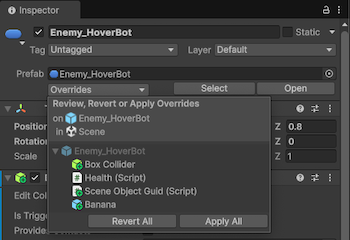
To apply or revert changes to a prefab asset:
- Select the prefab instance in the Hierarchy.
- In the Inspector, select Override.
- You can apply or revert overrides in the following ways:
- To apply or revert all overrides to the prefab asset, select Apply All or Revert All.
- To apply or revert a selection of overrides to the prefab asset, click the override, and then use Ctrl (macOS: Command), or Shift to select the overrides. Then select Apply Selected or Revert Selected.
- To apply or revert an individual override, select the individual override, and then select Revert or Apply. Depending on the context, you can choose to apply the override to the prefab asset, or the prefab variant.
If there are unused overrides on any selected objects, the Overrides drop down displays an option that allows you to remove them.
Apply individual overrides with the context menu
You can also revert or apply individual overrides to a prefab asset with the context menu in the Inspector or Hierarchy. To do so:
- For added, removed, or modified components, select the More menu (three dots), and then select Added Component, Removed Component, or Modified Component. You can then select Revert or Apply.
- For individual properties, right-click on the property and select Apply or Revert.
- For added GameObjects, right-click the object in the Hierarchy and then select Added GameObject > Apply or Revert.
The options available in the context menus vary depending on the type of prefab. For example, if the prefab instance has a nested prefab, you can use the context menu to apply overrides to either the prefab asset of the nested prefab, or the prefab asset of the root prefab instance. Similarly, if you’ve created a prefab variant, you can choose to apply the override to the prefab variant, or the original prefab asset.