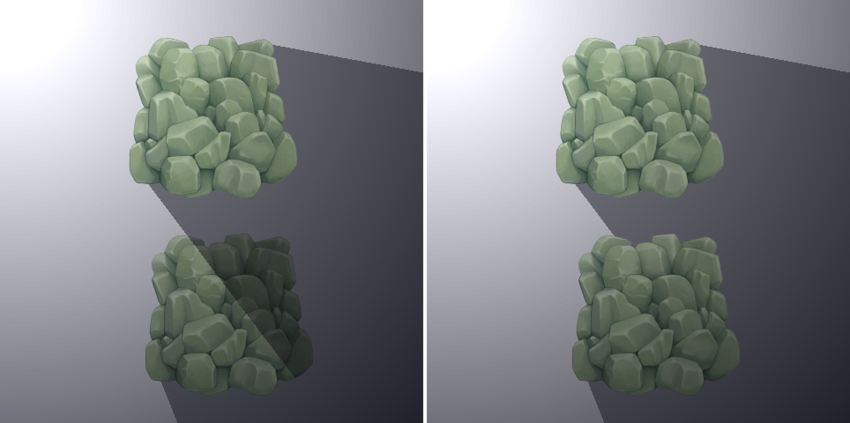
Add shadows from 2D lights in URP
To add shadows from 2D light in the Universal Render Pipeline (URP), add the Shadow Caster 2D component to a GameObject. Follow these steps:
Note: To see cast shadows, you must have a 2D light in your scene with its Shadows property enabled. For more information, refer to 2D lights in URP.
- Select the GameObject you want to cast shadows.
- In the Inspector window, select Add Component.
- Type Shadow Caster 2D, then select the Shadow Caster 2D item.
Change the shape of a shadow
By default, the shadow is the shape defined in the Custom Outline window of the Sprite Editor. Unity displays the shape as a white outline in the Scene view.
To set a specific shape for the shadow, do the following:
- Select the GameObject with the Shadow Caster 2D component.
- In the Inspector window, set the Casting Source property to Shape Editor.
- Select Edit Shape.
Adjust the shape in the Scene view by doing the following:
- To move a point, click and drag the point. You can also select the point, then manually enter the new position in the Position property of the Shadow Caster 2D component.
- To add a point, click a line at the position you want to add the point.
Merge shadows from multiple GameObjects
To merge shadows from multiple GameObjects into a single shadow, add a Composite Shadow Caster 2D to a parent GameObject. Follow these steps:
- Create an empty GameObject.
- In the Inspector window, select Add Component.
- Type Composite Shadow Caster 2D, then select the Composite Shadow Caster 2D item.
- Add GameObjects as children of the GameObject in the Hierarchy window. If the child GameObjects have Shadow Caster 2D components, their shadows are merged.