UI Toolkit live reload
Use the UI Toolkit live reload feature to view changes to your UI immediately in the Unity Editor and runtime UI. When you make changes to your UI, such as modifying a UXML or USS file in UI Builder or a text editor, the changes are automatically applied without needing to enter Play mode or manually refresh the UI.
Editor windows
For an Editor window, live reload is disabled by default. You can enable it through the Editor window’s More (⋮) menu. It applies to all windows of the same type.
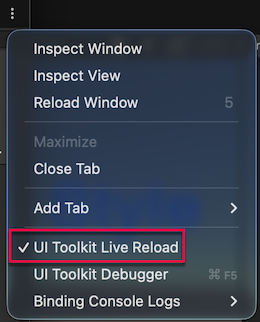
Note: Live reload recreates the entire UI. If you need to preserve state or values, store them so the window restores them after recreation.
Runtime
For the runtime, live reload is enabled by default. You can disable it through the Game view’s More (⋮) menu. It applies to all Game views.
Note: If you use a Panel Renderer component on your GameObject, register a UI reload callback with RegisterUIReloadCallback that is called when the UI is first initialized, but also when a live reload occurs. For more information, refer to Lifecycle of Panel Renderer components.