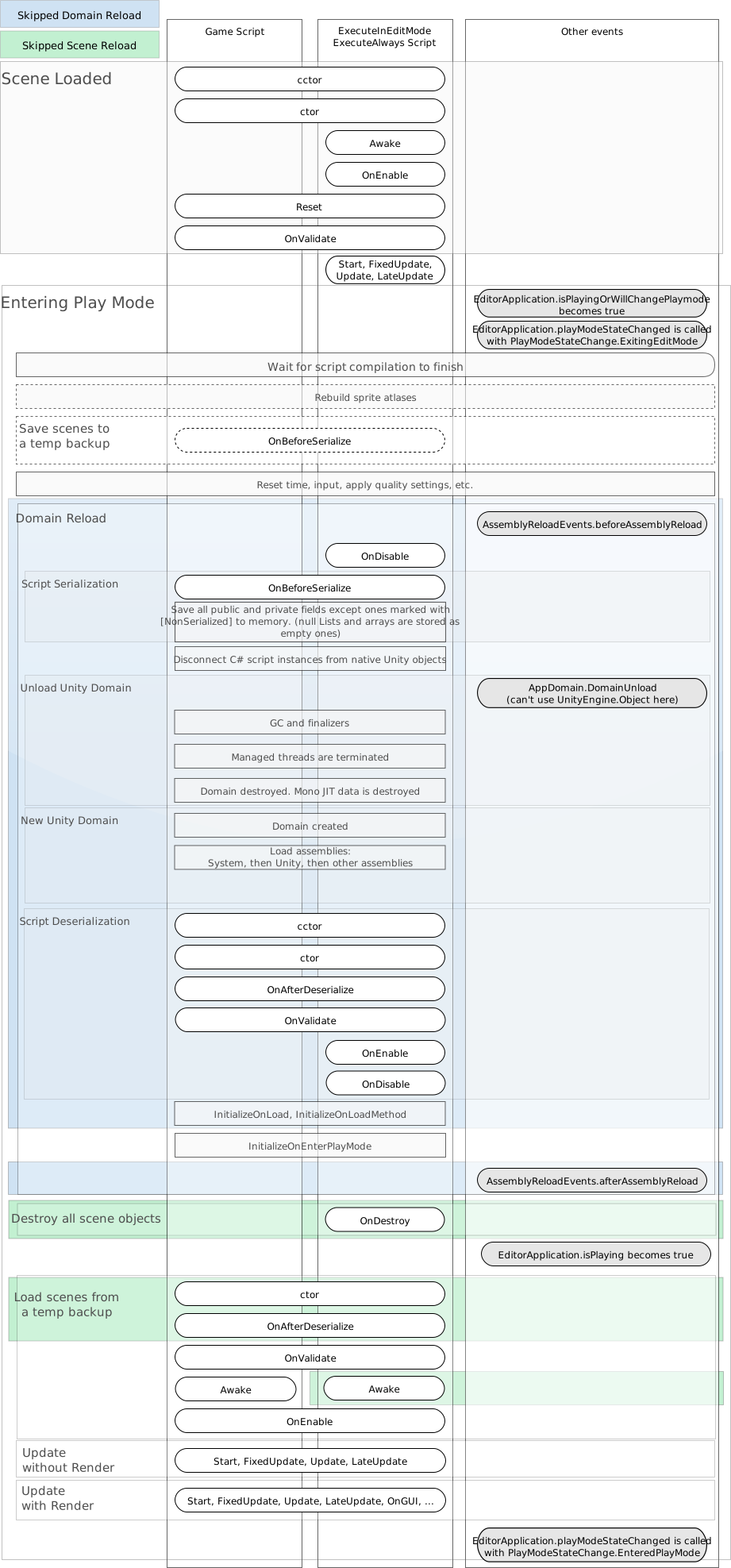
Domain and scene reload execution order reference
From a high-level perspective, entering Play mode consists of the following main stages:
- Backup current scenes. This only happens when the Scene has been modified. Allows Unity to revert the Scenes when exiting Play mode to the state they were in before Play mode started.
- Domain reload. Resets the scripting state, by reloading the scripting domain.
- Scene reload. Resets the Scene state, by reloading the Scene.
- Update scene. This happens twice; once without rendering, and once with rendering.
The combined tasks of domain reload and scene reload resets the scripting domain and simulates the startup behavior of your application as it would run in the Player. Unity skips these steps when you disable them in your Project Settings.
The following diagram provides detailed information about the exact steps Unity performs during scene and domain reload, and which steps it skips when they’re turned off. Blue indicates the events Unity skips when domain reload is off, and green indicates the events Unity skips when scene reload is off.