Wind shader configuration and tuning
The Runtime SDK wind shader functions take SWindInputSdk.m_sOptions (of type SWindOptionsSdk) as part of their input. Explanations for each function are as follows:
| Function | Description |
|---|---|
m_bDoShared |
Corresponds to the Global Motion settings in the Modeler. When disabled, the global motion contribution is skipped. |
m_bDoBranch1 |
Corresponds to the Branch Motion 1 settings in the Modeler. When disabled, the branch motion contribution is skipped. |
m_bDoBranch2 |
Corresponds to the Branch Motion 2 settings in the Modeler. When disabled, the branch motion contribution is skipped. Branch wind can be the most expensive wind component in a SpeedTree vertex shader, so enabling the second level only for the models that need it can help with optimization. |
m_bDoRipple |
Corresponds to the Frond Motion settings in the Modeler. When disabled, the frond rippling behavior is skipped. |
m_bDoShimmer |
Corresponds to the Adjust lighting option in the Frond Motion settings in the Modeler. When disabled, this single effect will be skipped. |
m_bLodFade |
Unused by our sample shader but can be used to have more detailed wind effects up close and gradually transition to simpler effects like global motion only. |
m_fWindIndependence |
Controls how synchronized two wind instances will be. At 0.0, two instances will exhibit identical wind behavior, whereas 1.0 is no synchronization. |
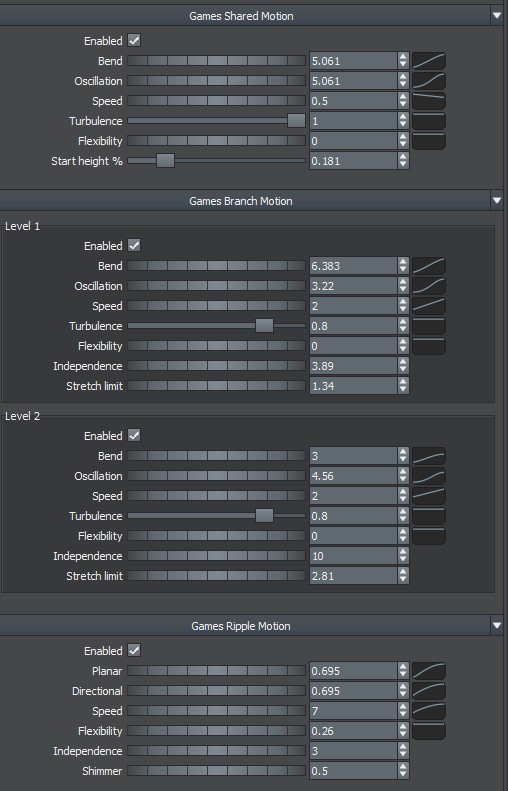
The following shows the corresponding wind editor settings in the Modeler:
Optimization
One technique for measuring the impact each option might have on performance is to try compiling the sample shaders in [SDK]/SampleForest/Shaders/ in dx11 mode to see how the output instruction count varies. See Shader Compilation for more information.