Coordinate systems
Because the SpeedTree run-time is not a complete game engine in and of itself, it must work well with multiple engines and engine configurations. This means working with numerous coordinate systems.
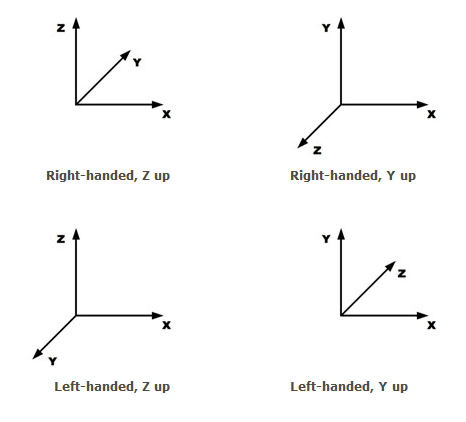
The default coordinate system used by the Runtime SDK is right-handed with Z considered "up." If this is your coordinate system, no changes will be necessary. If not, you'll need to use the system described below to establish your coordinate system. Example code is provided for the following coordinate systems:
Accessing materials
Include Core/CoordSys.h to access the coordinate conversion system. The CCoordSys class is used for most operations, starting with selecting the desired coordinate system. CCoordSys::SetCoordSys() allows the client application to select a preset coordinate system or define their own. The presets are in the enumeration ECoordSysType:
- ST_COORD_SYS_RIGHT_HANDED_Z_UP (default)
- ST_COORD_SYS_RIGHT_HANDED_Y_UP
- ST_COORD_SYS_LEFT_HANDED_Z_UP
- ST_COORD_SYS_LEFTT_HANDED_Y_UP
- ST_COORD_SYS_CUSTOM
The Runtime SDK defines an abstract base class for defining a coordinate system conversion object. The listing is below:
///////////////////////////////////////////////////////////////////////
//  Class CCoordSysBase

class CCoordSysBase
{
public:
virtual st_bool      IsLeftHanded(void) const = 0;
virtual st_bool      IsYAxisUp(void) const = 0;

virtual Vec3         ConvertToStd(st_float32 x, st_float32 y, st_float32 z) const = 0;
virtual Vec3         ConvertFromStd(st_float32 x, st_float32 y, st_float32 z) const = 0;

virtual const Vec3&  OutAxis(void) const = 0;
virtual const Vec3&  RightAxis(void) const = 0;
virtual const Vec3&  UpAxis(void) const = 0;

virtual st_float32   OutComponent(st_float32 x, st_float32 y, st_float32 z) const = 0;
virtual st_float32   RightComponent(st_float32 x, st_float32 y, st_float32 z) const = 0;
virtual st_float32   UpComponent(st_float32 x, st_float32 y, st_float32 z) const = 0;

virtual void         RotateUpAxis(Mat3x3& mMatrix, st_float32 fRadians) const = 0;
virtual void         RotateUpAxis(Mat4x4& mMatrix, st_float32 fRadians) const = 0;
virtual void         RotateOutAxis(Mat3x3& mMatrix, st_float32 fRadians) const = 0;
virtual void         RotateOutAxis(Mat4x4& mMatrix, st_float32 fRadians) const = 0;
Shaders
The shader source uses the macros ST_COORDSYS_Z_UP, ST_COORDSYS_Y_UP, ST_COORDSYS_RIGHT_HANDED, and ST_COORDSYS_LEFT_HANDED that are each defined as true or false and are set at shader compilation time, based on the coordinate converter functions CCoordSysBase::IsYAxisUp() and CCoordSysBase::IsLeftHanded(). Difficulties may arise here with custom coordinate systems. By default (right-handed, z-up), these macros are set to:
| Macro | Default Value |
|---|---|
| ST_COORDSYS_Z_UP | true |
| ST_COORDSYS_Y_UP | false |
| ST_COORDSYS_RIGHT_HANDED | true |
| ST_COORDSYS_LEFT_HANDED | false |