Unity Gaming Services の初期化
UnityServices.InitializeAsync() を呼び出すことで、すべての Unity Gaming Services を一度に初期化できます。これを呼び出すと、初期化の進行状況を監視できる Task が返されます。
例
using System;
using Unity.Services.Core;
using Unity.Services.Core.Environments;
using UnityEngine;

public class InitializeUnityServices : MonoBehaviour
{
    public string environment = "production";

    async void Start()
    {
        try
        {
            var options = new InitializationOptions()
                .SetEnvironmentName(environment);

            await UnityServices.InitializeAsync(options);
        }
        catch (Exception exception)
        {
            // サービスの初期化中にエラーが発生しました。
        }
    }
}
Codeless IAP の自動初期化
Codeless IAP を使用している場合は、上記の代わりに IAP Catalog ウィンドウの下部にある Automatically initialize Unity Gaming Services チェックボックスをオンにすることで、Unity Gaming Services の自動初期化を有効にできます。これにより、アプリケーションを起動するとすぐに Unity Gaming Services が初期化されます。
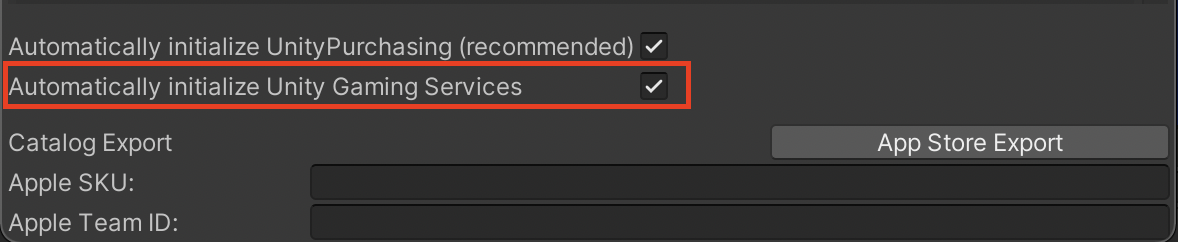 この機能を使用するには、Automatically initialize UnityPurchasing (recommended) を有効にする必要があります。IAP Catalog 内にこれらのチェックボックスが表示されていない場合は、カタログウィンドウにプロダクトがまだ追加されていないことが原因として考えられます。
チェックボックスをオンにすると、Unity Gaming Services がデフォルトの production 環境で初期化されます。この方法で Unity Gaming Services を初期化すると、特別な初期化オプションを必要とする可能性がある他のすべてのサービスとの互換性が失われる場合があります。初期化オプションを使用する必要がある場合は、前述のようにコード化された API で Unity Gaming Services を初期化してください。
警告メッセージ
Unity Gaming Services を初期化せずに Unity IAP サービスを使用しようとすると、以下のような、初期化を促す警告メッセージが表示されます。
Unity In-App Purchasing requires Unity Gaming Services to have been initialized before use.
Find out how to initialize Unity Gaming Services by following the documentation https://docs.unity.com/ugs-overview/services-core-api.html#InitializationExample
or download the 06 Initialize Gaming Services sample from Package Manager > In-App Purchasing > Samples.
(Unity アプリ内購入は、Unity Gaming Services を使用する前に初期化する必要があります。
ドキュメント https://docs.unity.com/ugs-overview/services-core-api.html#InitializationExample に従って、Unity Gaming Services を初期化する方法を確認してください。
または、Package Manager > In-App Purchasing > Samples から 06 Initialize Gaming Services サンプルをダウンロードしてください。)
技術に関する詳細
InitializeAsync メソッドは Unity プロジェクトに現在インストールされているサービスパッケージに影響を与えます。
なお、このメソッドは編集時にはサポートされません。
詳細については、Services Core API のドキュメント を参照してください。
具体的な例については、Package Manager > In-App Purchasing > Samples から 06 Initialize Gaming Services をダウンロードしてください。