Is Match フォーマッター
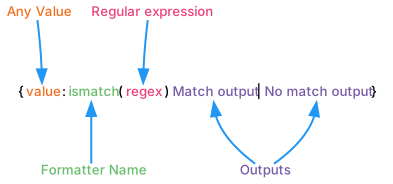
Is Match Formatter (Is Match フォーマッター) を使用して、出力を制御するために 正規表現 を評価できます。 Is Match フォーマッターはデフォルトでは含まれていません。Smart Format の設定 内で Formatters に追加することができます。
ノート: このフォーマッターのオプション部分では、全ての RegEx 文字が有効なわけではなく、例えば波括弧や丸括弧はサポートされていません。これは、他の全ての拡張機能と同じパーサーが使用されているためです。
| Smart String の例 | 引数 | 結果 |
|---|---|---|
| {theKey:ismatch(^.+123.+$):Okay - {}|No match content} | |
Okay - Some123Content |
| {theKey:ismatch(^.+123.+$):Fixed content if match|No match content} | |
Fixed content if match |
| {0:list:{:ismatch(^100|200|999$):{:0.00}|'no match'}|, | and } | |
100.00, 200.00 and 'no match' |
| {0:list:{:ismatch(^100|200|999$):'match'|'no match'}|, | and } | |
'match', 'match' and 'no match' |